

An expired TLS certificate brought down a major cloud provider’s control plane for four hours. Not a sophisticated attack. Not a cascading failure. A certificate expired because nobody renewed it. The automation that was supposed to handle renewal had its own expired certificate.
I wish this were an unusual story. It’s not. Expired certs are one of the most preventable causes of production outages, and they keep happening because manual certificate management doesn’t scale. You can’t rely on calendar reminders when you’re running hundreds of services across multiple clusters.
That’s the problem cert-manager solves. It’s a CNCF Graduated project - the same maturity level as Kubernetes itself - and it turns certificate lifecycle management into something the cluster handles automatically.
What cert-manager actually does
cert-manager is a Kubernetes controller that watches for Certificate resources and makes sure valid certificates exist. When a certificate is about to expire, cert-manager renews it. When you create a new Certificate resource, cert-manager provisions it. When you delete one, it cleans up.
The architecture has three components:
Controller - watches Certificate resources, triggers issuance and renewal
Webhook - validates and mutates cert-manager CRDs (makes sure your YAML is correct before it’s applied)
cainjector - injects CA bundles into webhooks and API services that need them
You install it once, configure your issuers, and then certificates just... work. No cron jobs. No scripts. No “I’ll renew it next week.”
Issuers: where certificates come from
Before cert-manager can issue a certificate, it needs to know where to get one. That’s what Issuers are for.
Issuer vs ClusterIssuer
Two scopes, same concept:
Issuer - namespaced. Can only issue certificates within its own namespace.
ClusterIssuer - cluster-wide. Can issue certificates for any namespace.
For most setups, a ClusterIssuer for Let’s Encrypt is the starting point:
apiVersion: cert-manager.io/v1
kind: ClusterIssuer
metadata:
  name: letsencrypt-prod
spec:
  acme:
    server: https://acme-v02.api.letsencrypt.org/directory
    email: ops@example.com
    privateKeySecretRef:
      name: letsencrypt-prod-key
    solvers:
      - http01:
          ingress:
            class: nginx
This tells cert-manager: “Use Let’s Encrypt’s production API. Prove domain ownership via HTTP-01 challenges. Use the nginx ingress controller to serve the challenge responses.”
ACME challenge types
ACME (the protocol Let’s Encrypt uses) supports two challenge types:
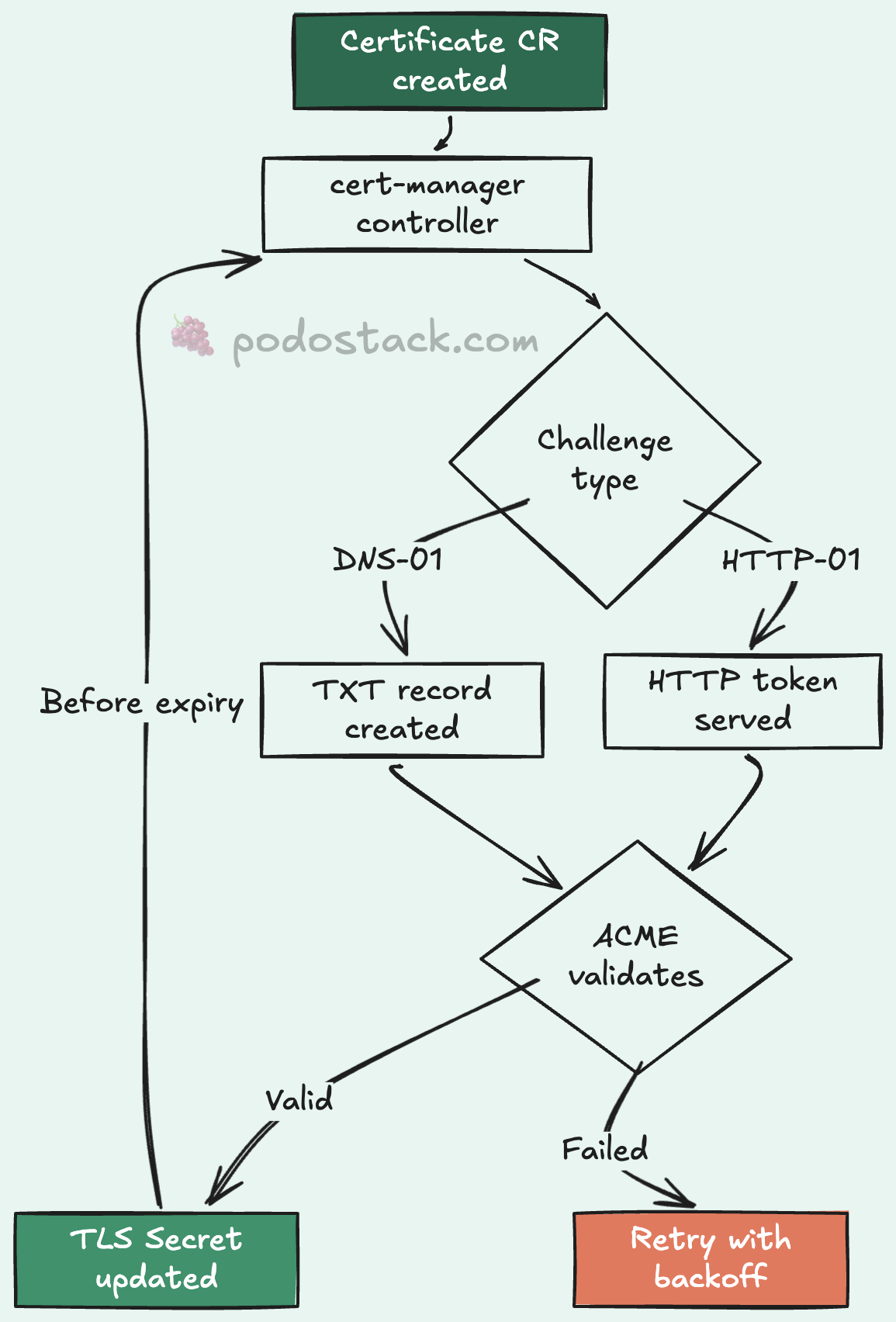
HTTP-01 - cert-manager creates a temporary endpoint on your ingress. Let’s Encrypt hits it to verify you control the domain. Simple, works for most cases, but requires your ingress to be publicly accessible.
DNS-01 - cert-manager creates a TXT record in your DNS zone. Works for wildcard certificates and internal services that aren’t publicly accessible. Requires DNS provider integration (Route53, CloudFlare, Google Cloud DNS, etc.):
solvers:
  - dns01:
      route53:
        region: us-east-1
        hostedZoneID: Z0123456789
I’d say 80% of the setups I’ve worked with use HTTP-01 for simplicity. The other 20% need DNS-01 for wildcards or private clusters.
Beyond ACME
cert-manager isn’t limited to Let’s Encrypt. It supports multiple issuer types:
ACME - Public certificates (Let’s Encrypt, ZeroSSL)
CA - Internal PKI with your own CA
Vault - HashiCorp Vault as certificate authority
SelfSigned - Development, bootstrapping
Venafi - Enterprise certificate management
The CA issuer is particularly useful for internal services. You create a root CA secret, point an Issuer at it, and cert-manager handles everything else:
apiVersion: cert-manager.io/v1
kind: ClusterIssuer
metadata:
  name: internal-ca
spec:
  ca:
    secretName: internal-ca-keypair
Ingress TLS automation
The most common use case: automatic TLS for your ingress resources. You add an annotation and a tls block, and cert-manager takes care of the rest:
apiVersion: networking.k8s.io/v1
kind: Ingress
metadata:
  name: my-app
  annotations:
    cert-manager.io/cluster-issuer: letsencrypt-prod
spec:
  tls:
    - hosts:
        - app.example.com
      secretName: app-example-com-tls
  rules:
    - host: app.example.com
      http:
        paths:
          - path: /
            pathType: Prefix
            backend:
              service:
                name: my-app
                port:
                  number: 8080
That’s it. cert-manager sees the annotation, creates a Certificate resource, performs the ACME challenge, stores the certificate in the app-example-com-tls secret, and renews it before expiry. The default renewal window is 30 days before expiration.
No manual certificate generation. No copying PEM files around. No forgetting to renew.
Certificate resources directly
For services that don’t use ingress - gRPC services, internal APIs, databases - you can create Certificate resources directly:
apiVersion: cert-manager.io/v1
kind: Certificate
metadata:
  name: api-internal-cert
  namespace: backend
spec:
  secretName: api-internal-tls
  duration: 2160h    # 90 days
  renewBefore: 360h  # Renew 15 days early
  issuerRef:
    name: internal-ca
    kind: ClusterIssuer
  dnsNames:
    - api.backend.svc.cluster.local
    - api.backend.svc
cert-manager creates a Kubernetes Secret containing tls.crt and tls.key. Mount it into your pods like any other secret. When it’s renewed, the secret gets updated, and pods that watch for file changes pick up the new certificate automatically.
mTLS with the CSI driver
For pod-to-pod encryption, cert-manager has a CSI driver that provisions unique certificates per pod. Each pod gets its own identity:
volumes:
  - name: tls
    csi:
      driver: certs.cert-manager.io
      readOnly: true
      volumeAttributes:
        csi.cert-manager.io/issuer-name: internal-ca
        csi.cert-manager.io/dns-names: ${POD_NAME}.${POD_NAMESPACE}.svc
The certificate is created when the pod starts and cleaned up when it stops. No shared secrets. No wildcard certs covering your entire cluster. Each pod proves its own identity. That’s proper zero-trust networking without a full service mesh.
GitOps integration
Everything in cert-manager is a CRD. Issuers, Certificates, challenges - they’re all Kubernetes resources. This means they fit naturally into GitOps workflows:
repo/
├── base/
│   ├── cluster-issuers/
│   │   ├── letsencrypt-prod.yaml
│   │   └── internal-ca.yaml
│   └── certificates/
│       ├── api-tls.yaml
│       └── dashboard-tls.yaml
└── overlays/
    ├── staging/
    │   └── cluster-issuers/
    │       └── letsencrypt-staging.yaml
    └── production/
        └── cluster-issuers/
            └── letsencrypt-prod.yaml
Staging uses Let’s Encrypt’s staging API (higher rate limits, untrusted certs). Production uses the real one. Same manifests, different issuers. ArgoCD or Flux handles the rest.
Troubleshooting the common gotchas
Certificate stuck in “Issuing” state. Check the challenge:
kubectl get challenges -A
kubectl describe challenge <name> -n <namespace>
Nine times out of ten, it’s a DNS issue. The ACME server can’t reach your HTTP-01 endpoint, or the DNS-01 TXT record hasn’t propagated.
Rate limits on Let’s Encrypt. The production API has rate limits: 50 certificates per registered domain per week. If you’re hitting this, you’re probably re-issuing certificates too often. Check that secretName in your Ingress or Certificate resources is stable - if it changes, cert-manager treats it as a new certificate.
Webhook timeout during install. The cert-manager webhook needs its own TLS certificate to start. On fresh installs, this can be a chicken-and-egg problem. The cainjector component solves it, but it needs a few seconds. If kubectl apply fails immediately after installing cert-manager, wait 30 seconds and try again.
Why this matters
Every production outage caused by an expired certificate is preventable. cert-manager makes it automatic. It’s not just about convenience - it’s about removing an entire class of incidents from your on-call rotation.
Install it, configure an issuer, add an annotation to your ingress, and move on to problems that actually require human judgment. Certificates shouldn’t be one of them.
Found this useful? Subscribe to Podo Stack for weekly Cloud Native tools and Kubernetes insights ripe for production.
Have you had an expired-cert outage? Or a cert-manager migration story? I’d love to hear about it - reply to this email or leave a comment below.