

Pull :latest. Deploy to production. Something breaks. Roll back.
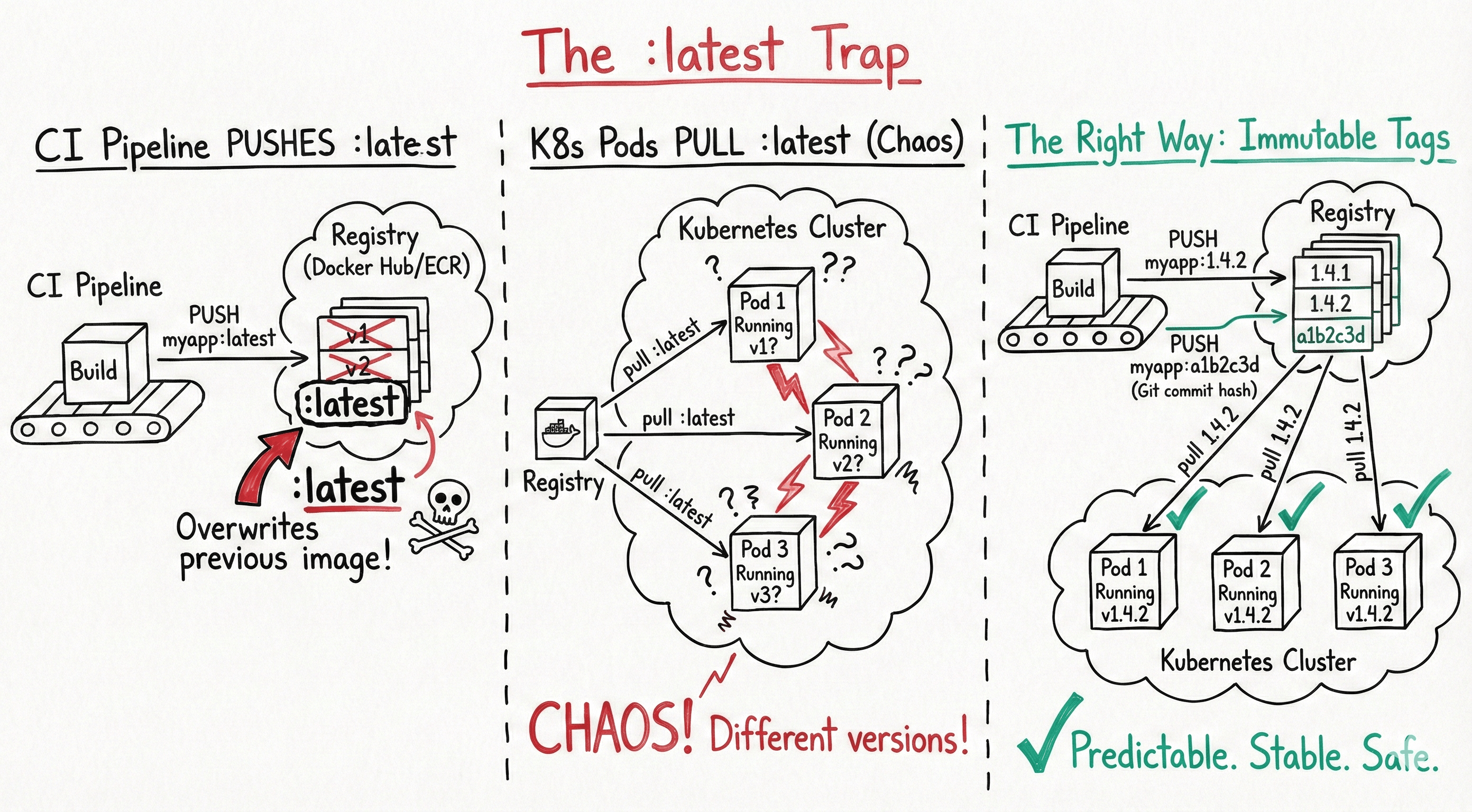
You pull :latest again. You get the same broken image. Because :latest isn’t a version. It’s a pointer. And someone moved it 20 minutes ago.
I’ve watched this exact scenario play out at least a dozen times across different teams. The tag says latest, the image inside is different from what you deployed yesterday, and nobody can tell you what changed. No audit trail. No way to diff. Just vibes and docker history.
Here’s the thing most people don’t internalize until they’ve been burned: Docker tags are mutable by default. They’re not like Git tags. They’re not like semantic versions in npm. They’re pointers that anyone with push access can move at any time. And :latest is the most abused pointer of them all.
So let’s talk about what actually works.
The :latest trap
When you build a Docker image without specifying a tag, Docker automatically applies :latest. When you push it, whatever was previously tagged :latest in your registry gets overwritten. The old image isn’t deleted - it becomes an untagged blob sitting in your registry, consuming storage and confusing everyone.
# What most tutorials show you
docker build -t myapp .
docker push myapp

# What actually happens
docker build -t myapp:latest .
docker push myapp:latest
# Previous "latest" image is now untagged
This creates several problems that compound over time.
No rollback path. If :latest is broken, pulling :latest gives you the broken version. You can’t point to “the one before latest” without digging through registry manifests or CI logs.
No reproducibility. Two docker pull myapp:latest commands five minutes apart can return different images. Your staging environment and production might be running different code, both tagged :latest.
No audit trail. When the incident review asks “what version was running at 3 AM?”, the answer is “latest.” Great. Very helpful.
Kubernetes makes it worse. If your deployment spec says image: myapp:latest, Kubernetes uses the imagePullPolicy of Always by default for :latest. Every pod restart pulls whatever :latest currently points to. Rolling updates become unpredictable. I’ve seen deployments where different pods in the same ReplicaSet were running different image versions because some pods restarted during a push.
# This is a footgun
spec:
  containers:
    - name: myapp
      image: myapp:latest  # Don't do this in production
Here’s a number that stuck with me: at one company I worked with, we traced 3 out of 5 production incidents in a single quarter back to :latest tag confusion. Three incidents. From a tagging choice. That’s when we banned it from production manifests entirely.
When :latest is actually fine
It’s not all bad. :latest works well for local development, quick prototyping, and tutorials. If you’re iterating on a Dockerfile and rebuilding every 30 seconds, tagging each build with a unique version is pointless overhead. Just use :latest, test it, move on.
The problem isn’t the tag itself. It’s using it where immutability and traceability matter.
Semantic Versioning: the industry standard
SemVer (MAJOR.MINOR.PATCH) is the most widely understood tagging convention, and for good reason. It encodes meaning into the version number.
MAJOR (v2.0.0) - breaking changes, API incompatibilities
MINOR (v1.3.0) - new features, backward compatible
PATCH (v1.3.7) - bug fixes, no new features
# Tag with full SemVer
docker build -t myapp:1.4.2 .
docker push myapp:1.4.2

# Also maintain floating tags for convenience
docker tag myapp:1.4.2 myapp:1.4
docker tag myapp:1.4.2 myapp:1
docker push myapp:1.4
docker push myapp:1
The multi-level tagging is important. myapp:1.4.2 is immutable - it always points to exactly one image. myapp:1.4 floats to the latest patch in the 1.4 series. myapp:1 floats to the latest minor version in the 1.x series.
This gives consumers a choice: pin to exact versions for production, or float on minor/patch for environments where you want automatic updates.
SemVer in Kubernetes
In production Kubernetes manifests, always use the full version:
spec:
  containers:
    - name: myapp
      image: myapp:1.4.2          # Exact version - reproducible
      imagePullPolicy: IfNotPresent  # Won't re-pull on restart
For development or staging environments, you might float on minor:
spec:
  containers:
    - name: myapp
      image: myapp:1.4            # Gets latest patch automatically
      imagePullPolicy: Always     # Re-pull to catch updates
The discipline problem
SemVer’s biggest weakness isn’t technical. It’s human. Someone has to decide whether a change is major, minor, or patch. I’ve seen teams bump the patch version for breaking API changes because they “didn’t think it was that big a deal.” I’ve seen major version bumps for CSS tweaks because the PR author was being cautious.
If your team doesn’t have a clear policy on what constitutes a breaking change, SemVer becomes SemVer-ish. Close enough to be dangerous.
One approach that works: automate version bumps based on commit message conventions. Tools like semantic-release parse commit prefixes (feat:, fix:, BREAKING CHANGE:) and bump versions accordingly. The human decides the intent of each commit. The tooling translates that intent into a version number consistently.
Date and commit hash tags
For CI/CD pipelines, SemVer sometimes feels like overkill. You’re building on every merge. There’s no human deciding “this is a minor release.” You just want to track what code produced what image.
Two patterns work well here.
Commit SHA tags
Tag images with the Git commit hash that produced them:
COMMIT_SHA=$(git rev-parse --short HEAD)
docker build -t myapp:${COMMIT_SHA} .
docker push myapp:${COMMIT_SHA}
# Result: myapp:a1b2c3d
This gives you a direct link from any running container back to the exact code that built it:
# What code is running in production right now?
kubectl get pods -o jsonpath='{.items[*].spec.containers[*].image}'
# Output: myapp:a1b2c3d

git log a1b2c3d -1
# commit a1b2c3d - Fix payment retry logic
Debugging an incident at 2 AM? Check the running image tag, look up the commit, see exactly what changed. No guesswork. No “I think we deployed the fix on Tuesday.”
Date-based tags
Some teams prefer timestamps, especially for scheduled builds:
BUILD_DATE=$(date +%Y%m%d-%H%M%S)
docker build -t myapp:${BUILD_DATE} .
docker push myapp:${BUILD_DATE}

# Result: myapp:20260215-143022
Date tags are human-readable. You can glance at a pod and know roughly when it was built. But they lose the direct connection to source code. You’d need to cross-reference CI logs to find which commit produced the 20260215-143022 build.
Hybrid: the best of both worlds
Most mature CI/CD pipelines combine approaches:
COMMIT_SHA=$(git rev-parse --short HEAD)
BUILD_DATE=$(date +%Y%m%d)
BRANCH=$(git rev-parse --abbrev-ref HEAD)

# Primary tag: commit hash (immutable, traceable)
docker tag myapp:build myapp:${COMMIT_SHA}

# Secondary: date + commit for human readability
docker tag myapp:build myapp:${BUILD_DATE}-${COMMIT_SHA}

# Branch tag: for staging environments
docker tag myapp:build myapp:${BRANCH}-latest

# Push all tags
docker push myapp:${COMMIT_SHA}
docker push myapp:${BUILD_DATE}-${COMMIT_SHA}
docker push myapp:${BRANCH}-latest
This gives you immutability (commit SHA), readability (date), and convenience (branch tag for dev/staging). The branch tag is the only mutable one, and it’s explicitly scoped to non-production use.
Multi-tag strategy in CI/CD
Here’s a complete tagging strategy I’ve used successfully across multiple teams. It works for both application images and base images.
# GitHub Actions example
- name: Build and tag
  run: |
    COMMIT_SHA=$(git rev-parse --short HEAD)
    SEMVER=$(cat VERSION)  # or from git tag

    # Immutable tags
    docker tag myapp:build registry.example.com/myapp:${COMMIT_SHA}
    docker tag myapp:build registry.example.com/myapp:${SEMVER}

    # Floating tags (mutable)
    docker tag myapp:build registry.example.com/myapp:${SEMVER%.*}  # 1.4
    docker tag myapp:build registry.example.com/myapp:${SEMVER%%.*} # 1

    # Environment tags (mutable, overwritten each deploy)
    docker tag myapp:build registry.example.com/myapp:staging
    docker tag myapp:build registry.example.com/myapp:production
The key principle: immutable tags for production deploys, mutable tags for convenience. Know which is which, and never mix them up.
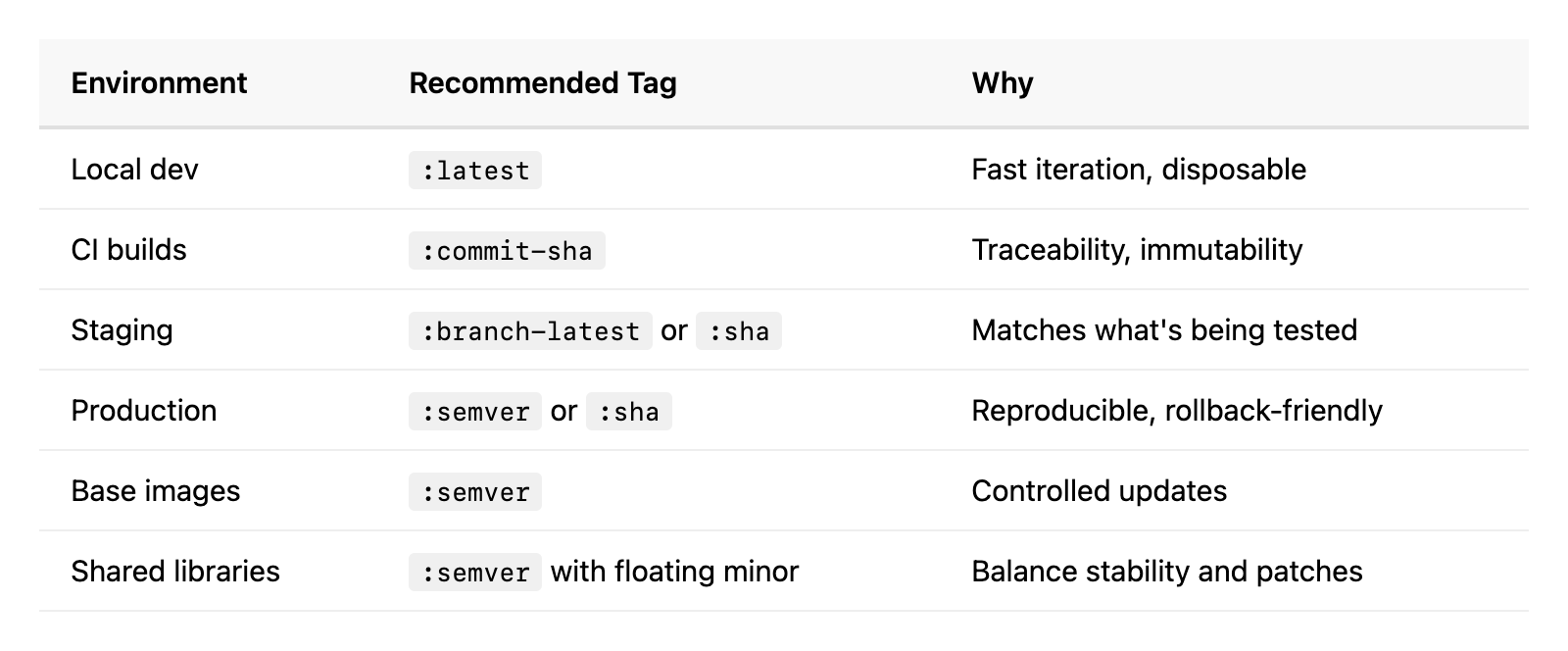
The decision table
Not sure which strategy fits? Here’s a quick reference:
Common mistakes and how to avoid them
Using :latest in Kubernetes manifests. We covered this. Pin your versions. If your deployment tool needs :latest, your deployment tool is wrong.
Not cleaning up old tags. Registries grow. Fast. Set a retention policy. Most registries support lifecycle policies that delete untagged images or images older than N days. Docker Hub, ECR, GCR, and Harbor all support this.
# ECR lifecycle policy example - keep only last 50 images
aws ecr put-lifecycle-policy --repository-name myapp --lifecycle-policy-text '{
  "rules": [{
    "rulePriority": 1,
    "selection": {
      "tagStatus": "any",
      "countType": "imageCountMoreThan",
      "countNumber": 50
    },
    "action": { "type": "expire" }
  }]
}'
Overwriting SemVer tags. If 1.4.2 exists, don’t push a different image with the same tag. This breaks the entire point of SemVer. Some registries support tag immutability - enable it. ECR has this. So does Harbor. Use it.
Not signing images. Tags can be overwritten, registries can be compromised. Use Docker Content Trust or cosign from Sigstore to sign your images. Verify signatures in your admission controller. This is defense in depth against supply chain attacks.
# Sign with cosign
cosign sign --key cosign.key registry.example.com/myapp:1.4.2

# Verify before deploy
cosign verify --key cosign.pub registry.example.com/myapp:1.4.2
Forgetting to tag at all. Every docker push without an explicit tag goes to :latest. Make your CI pipeline fail if someone tries to push without a proper tag. A simple check in your build script saves hours of debugging later.
Image tag immutability: the underrated feature
Most container registries support making tags immutable. Once you push myapp:1.4.2, nobody can overwrite it. Ever. You’d have to delete and recreate the tag, which is auditable and obvious.
I strongly recommend enabling this for production registries. It turns your image tags from “probably this image” to “definitely this image.” The peace of mind is worth the minor inconvenience of bumping versions for every build.
# ECR: enable tag immutability
aws ecr put-image-tag-mutability \
  --repository-name myapp \
  --image-tag-mutability IMMUTABLE

# Now this fails if 1.4.2 already exists:
docker push myapp:1.4.2
# Error: tag already exists
Putting it all together
Your tagging strategy doesn’t need to be complex. It needs to be consistent and enforced. Here’s what I’d recommend for most teams:
Ban
:latestfrom production. Use a linting tool or admission webhook to reject it.Use SemVer for releases. Automate version bumps with conventional commits.
Use commit SHAs in CI. Every build gets a unique, traceable, immutable tag.
Enable tag immutability. On your production registry, at minimum.
Set retention policies. Don’t let your registry grow unbounded.
Sign your images. Trust but verify. Especially in multi-team environments.
The point isn’t to pick the “best” tagging strategy. It’s to pick one deliberately, enforce it consistently, and make sure everyone on the team understands why. A mediocre strategy applied consistently beats a perfect strategy applied “most of the time.”
Because “most of the time” is exactly when :latest sneaks back in.