

Somebody resized the node group. Bigger instance type, same everything else, a routine change done during business hours because it carries no risk.
Changing an EC2 instance type means stop, modify, start. And a stop wipes every instance-store volume attached to that host, permanently, before the instance comes back. The ClickHouse data directory was on one of them.
The cluster recovered from replicas and nobody lost a customer. What stayed with me is that nothing in the change ticket, the Terraform plan, or the console warned about it. The disk's called a volume, it mounts like a volume, df reports it like a volume. It just isn't one.
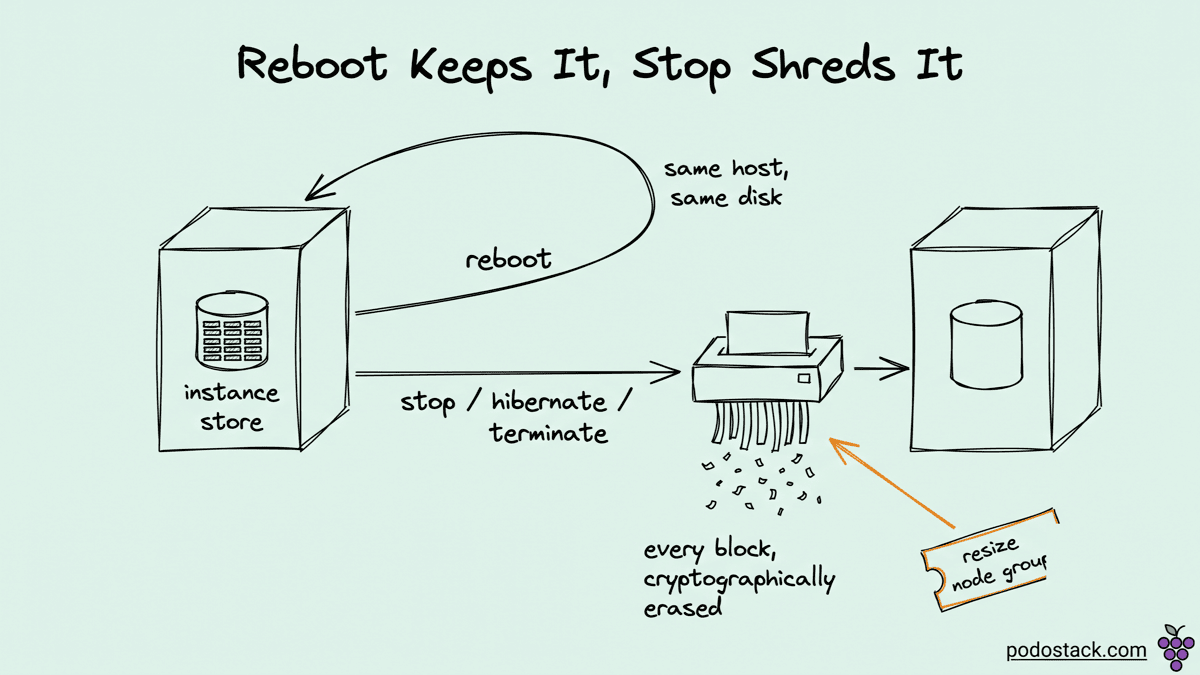
Reboot keeps it, stop shreds it
The rule has an edge that catches people, because two operations that feel equivalent are not:
Reboot: data survives
Stop, then start: gone
Hibernate: gone
Terminate: gone
Underlying host failure: gone
Reboot keeps the instance on the same physical host, so the disks are still right there. Stop releases the host. When you start again you get a different machine with different disks, and AWS will not carry the old ones across.
The wording in the AWS documentation is worth reading closely, because it describes a mechanism rather than a policy: when the instance is stopped, hibernated, or terminated, every block of the instance-store volume is cryptographically erased. There's no dangling copy that a support ticket can recover. The key is destroyed and the blocks become noise.
Hibernate is the one that catches people who read half the docs. Hibernation saves RAM to the root EBS volume and feels like a pause rather than a stop, so the instinct is that everything survives. The instance-store volumes stay attached and their contents are gone.
Why it's fast, in one sentence
The disk is on the PCIe bus of the host your instance runs on. EBS is storage over a network, however good that network is.
That's the whole difference, and everything else follows from it. No network hop means latency in microseconds rather than milliseconds, and IOPS in the hundreds of thousands to millions rather than the tens of thousands an EBS volume will give you without a provisioned-IOPS bill. You also stop paying for the IO, because there isn't anything to meter: the disk comes with the instance.
The trade is not performance versus cost. It's performance against whether the disk exists tomorrow.
The taxonomy that actually decides it
One question sorts almost every workload: if this disk vanished right now, who reconstructs the data, and how long does it take?
If the answer is "nobody, it's gone" then instance store is wrong, whatever the benchmark says.
If the answer is "the system does it, automatically, and we've tested that" then instance store is often the best storage in EC2 for the job. Three shapes qualify.
Caches. Redis or Valkey or Memcached holding hot data that has a source of truth elsewhere. Losing it costs you a cold period, not data.
Scratch space. ETL intermediates, video encoding, model training checkpoints you can regenerate, build artifacts. Anything where the file exists to be consumed and then deleted.
Distributed stores that own their replication. ClickHouse, Cassandra, ScyllaDB, Elasticsearch data nodes. A node that loses its disk gets rebuilt from peers, which these systems are designed around rather than treating it as an incident.
The trap in that third category is the word "distributed". A three-node cluster with replication factor 1 is distributed and it'll still lose data permanently when one node stops. The property that matters is the replication factor, not the topology.
What this means on Kubernetes
Instance store shows up in a cluster as a node-local disk, which puts you in one of two patterns.
Either you use it as ephemeral storage for the kubelet itself, which is a straightforwardly good idea. Container images, emptyDir, and the writable layer all live on /var/lib/kubelet and /var/lib/containerd. Putting those on instance-store NVMe makes image pulls and container startup measurably faster, and everything there is already expected to disappear with the node.
Or you use it for a StatefulSet through a local-volume provisioner, and that's where care is needed. A local PersistentVolume binds a pod to a specific node. When that node goes away the PV becomes unusable and the pod stays Pending until somebody cleans it up. That's the correct behaviour for local storage, and it's nothing like the recovery story people expect from a PVC.
If you're on Karpenter or any consolidation-happy autoscaler, add this to the list: consolidation stops and replaces nodes. That's the same erase path as the manual resize. Workloads on instance store need to either tolerate node replacement by design, or carry a karpenter.sh/do-not-disrupt annotation and an explicit story for how you ever patch them.
The limits worth knowing
You can't attach instance store after the fact. It comes with the instance type or it doesn't, and the only way to add it is to launch a different type. That's the opposite of EBS, and it changes capacity planning: storage becomes a property of the instance family, not a dial.
Storage-optimized families are where it lives in quantity, and both the sizes and the naming move faster than any article can track. Check the current instance-type table rather than trusting a number you read somewhere, including here.
And one operational note that costs people an afternoon. On most storage-optimized types the NVMe devices arrive raw. No filesystem, no mount, no entry in /etc/fstab. A fresh instance has fast empty disks that nothing's using until userdata or your AMI formats and mounts them, which is exactly the kind of step that works on the golden image and gets forgotten in the Terraform module.