

There’s a moment in every Kubernetes journey where nodeSelector stops being enough.
Maybe you need GPU nodes for training workloads but want everything else on general-purpose instances. Maybe you’re migrating to ARM64 and need a graceful fallback. Or maybe you just want to say “prefer this node pool, but don’t crash if it’s full.”
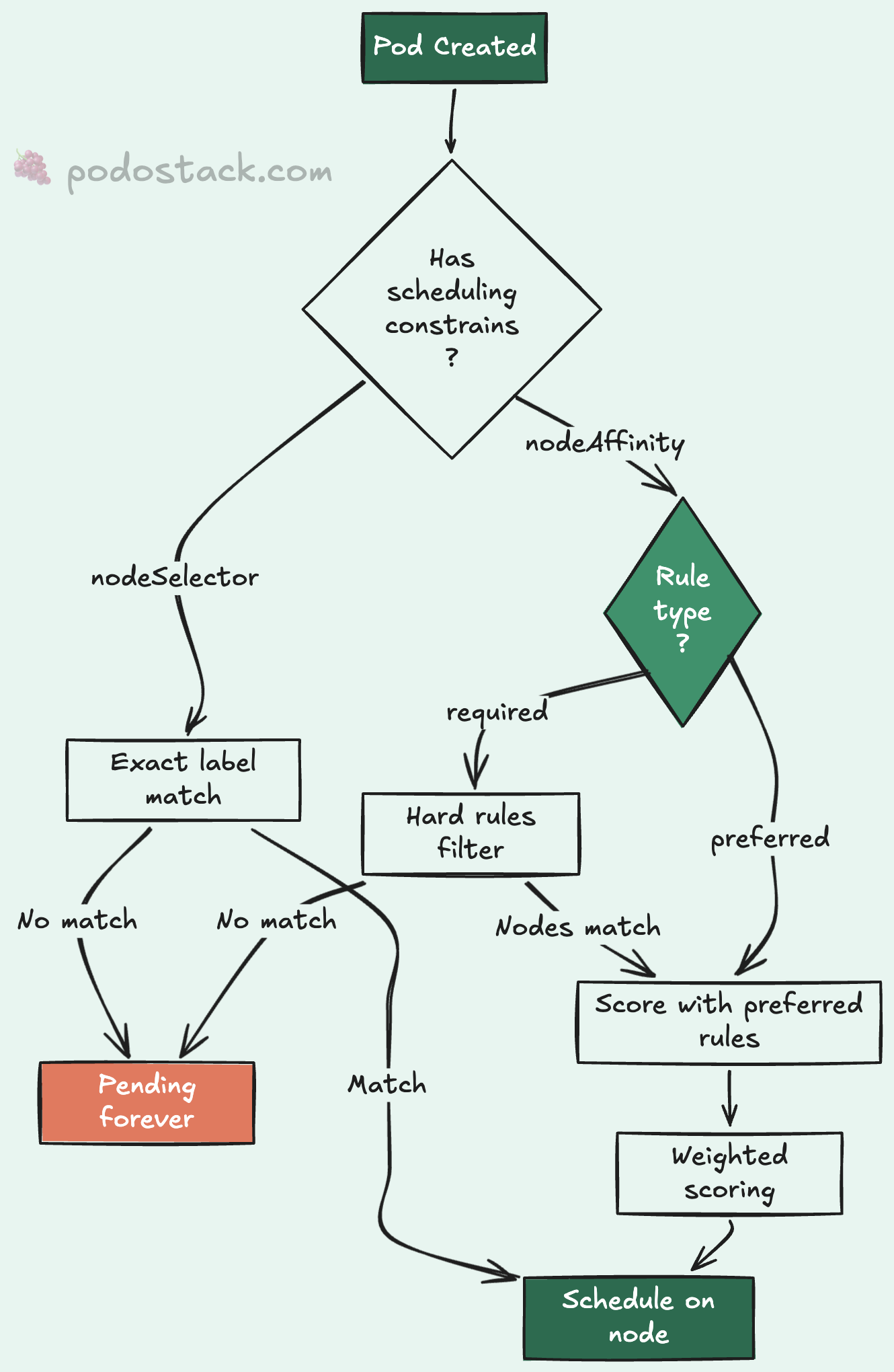
nodeSelector can’t express any of that. It’s a hard match - if the label isn’t there, the pod doesn’t schedule. Period. No fallback, no preference, no nuance.
That’s where nodeAffinity comes in. And honestly, once you understand it, you’ll wonder why you ever used nodeSelector for anything beyond the simplest cases.
nodeSelector: the one-liner
Let’s start with what you probably already know. nodeSelector matches pods to nodes by label:
spec:
  nodeSelector:
    disktype: ssd
This tells the scheduler: “only place this pod on nodes labeled disktype=ssd.” If no nodes match, the pod stays Pending forever. No fallback. No explanation beyond 0/5 nodes are available: 5 node(s) didn't match Pod's node affinity/selector.
For simple cases - “run database pods on SSD nodes” - it works fine. But the moment you need OR logic, preferences, or operators beyond equality, you’ve outgrown it.
nodeAffinity: the full toolkit
Node affinity lives under spec.affinity.nodeAffinity and comes in two flavors that you can combine freely.
requiredDuringSchedulingIgnoredDuringExecution
The name is a mouthful, but the idea is simple: hard rules. The pod won’t schedule unless the node matches. It’s nodeSelector with superpowers.
Here’s a production pattern I use constantly - pinning workloads to a specific node pool:
spec:
  affinity:
    nodeAffinity:
      requiredDuringSchedulingIgnoredDuringExecution:
        nodeSelectorTerms:
          - matchExpressions:
              - key: gitops/target
                operator: In
                values:
                  - api
This says: “only schedule on nodes where gitops/target is api.” If your infrastructure team labels node pools by purpose (api, workers, monitoring), this is how you enforce separation.
The IgnoredDuringExecution part means: if someone removes the label from a node after the pod is running, Kubernetes won’t evict it. The rule only applies at scheduling time.
preferredDuringSchedulingIgnoredDuringExecution
Soft preferences. The scheduler tries to honor them but won’t block scheduling if it can’t. This is where things get interesting.
spec:
  affinity:
    nodeAffinity:
      preferredDuringSchedulingIgnoredDuringExecution:
        - weight: 80
          preference:
            matchExpressions:
              - key: kubernetes.io/arch
                operator: In
                values:
                  - arm64
        - weight: 20
          preference:
            matchExpressions:
              - key: kubernetes.io/arch
                operator: In
                values:
                  - amd64
This tells the scheduler: “I’d really like ARM64 nodes (weight 80), but amd64 is fine too (weight 20).” The scheduler scores matching nodes by weight and picks the highest-scoring option. If no ARM64 nodes are available, amd64 nodes still work.
Weights range from 1 to 100. Higher weight means stronger preference. I’ve found that using weights like 80/20 or 90/10 makes the intent obvious to anyone reading the manifest later.
Combining hard and soft rules
The real power is mixing both. Here’s a pattern from a multi-arch production cluster:
spec:
  affinity:
    nodeAffinity:
      requiredDuringSchedulingIgnoredDuringExecution:
        nodeSelectorTerms:
          - matchExpressions:
              - key: gitops/target
                operator: In
                values:
                  - api
      preferredDuringSchedulingIgnoredDuringExecution:
        - weight: 80
          preference:
            matchExpressions:
              - key: kubernetes.io/arch
                operator: In
                values:
                  - arm64
        - weight: 20
          preference:
            matchExpressions:
              - key: kubernetes.io/arch
                operator: In
                values:
                  - amd64
Translation: “Must run on nodes in the api pool. Within that pool, prefer ARM64. Fall back to amd64 if needed.”
This is the pattern I keep coming back to. Hard-pin by pool label. Soft-prefer by architecture. It gives you cost savings from ARM64 without risking scheduling failures during scale-up or when ARM capacity is temporarily exhausted.
matchExpressions operators
Node affinity supports six operators, and they’re more powerful than nodeSelector‘s simple equality:
In - label value must match one of the specified values. The workhorse operator, covers most use cases.
NotIn - label value must NOT match any specified value. Use for exclusion rules like “not on spot instances.”
Exists - label key must exist, value doesn’t matter. Great for “any GPU node” scenarios.
DoesNotExist - label key must NOT exist. Useful for avoiding nodes with specific taints or roles.
Gt - label value (parsed as integer) must be greater than the specified value.
Lt - label value (parsed as integer) must be less than the specified value.
Exists is particularly handy when you don’t care about the label’s value - just whether the node has it. “Schedule on any node with a GPU, I don’t care which model.”
Gt and Lt are niche but useful for resource-aware scheduling. They compare the label value as an integer, so make sure your labels are actually numeric.
OR logic with multiple nodeSelectorTerms
Here’s something that trips people up: multiple nodeSelectorTerms are combined with OR, while multiple matchExpressions within a single term are combined with AND.
nodeSelectorTerms:
  - matchExpressions:            # Term 1
      - key: zone
        operator: In
        values: [us-east-1a]
      - key: disktype             # AND
        operator: In
        values: [ssd]
  - matchExpressions:            # OR Term 2
      - key: zone
        operator: In
        values: [us-west-2a]
This reads: “(zone is us-east-1a AND disk is SSD) OR (zone is us-west-2a).” You can build fairly complex placement logic this way without reaching for custom schedulers.
matchFields: pinning to specific nodes
Less common but worth knowing - matchFields lets you match against node fields rather than labels. The main use case is pinning to a specific node by name:
nodeSelectorTerms:
  - matchFields:
      - key: metadata.name
        operator: In
        values:
          - node-gpu-01
I’d caution against using this in production manifests. Hard-coding node names makes your deployments fragile. If node-gpu-01 gets replaced, your pods stop scheduling. Labels are almost always the better approach.
Practical tips
Always verify your labels first. Before writing affinity rules, check what labels your nodes actually have:
kubectl get nodes --show-labels
kubectl get nodes -l gitops/target=api
I can’t count how many times I’ve seen a pod stuck Pending because the affinity rule referenced a label that didn’t exist or was misspelled. The error message doesn’t say “label not found.” It says “0/N nodes are available.” You’re left guessing.
Start with preferred, promote to required. When rolling out a new affinity rule, start with soft preferences. Watch the scheduler’s behavior for a few days. Once you’re confident the right nodes exist and are labeled correctly, switch to hard requirements.
Don’t over-constrain. Every affinity rule reduces the scheduler’s options. If you combine five hard rules, you might end up with zero matching nodes during a scaling event. Keep it simple: one hard rule for pool selection, one soft rule for optimization.
Watch for the IgnoredDuringExecution trap. Both flavors ignore the rules after scheduling. If a node’s labels change while pods are running, those pods won’t be evicted. If you need that behavior, look into taints and tolerations instead - or wait for the long-discussed requiredDuringSchedulingRequiredDuringExecution that’s been in Kubernetes proposals for years.
Found this useful? Subscribe to Podo Stack for weekly Cloud Native tools and Kubernetes insights ripe for production.
How does your team handle multi-arch scheduling? Still using nodeSelector or have you made the jump to nodeAffinity? I’d love to hear what patterns work for you - reply to this email or leave a comment below.