

Run this in your Redis CLI:
SET counter 42
OBJECT ENCODING counter
You’ll get "int". Now do this:
SET counter "hello"
OBJECT ENCODING counter
That returns "embstr". And if you set a string longer than 44 bytes, you’ll get "raw".
Same command, same key, three different internal representations. Redis picks the most efficient encoding based on what you’re actually storing. And if you don’t understand how this works, you might be using 5-10x more memory than you need to.
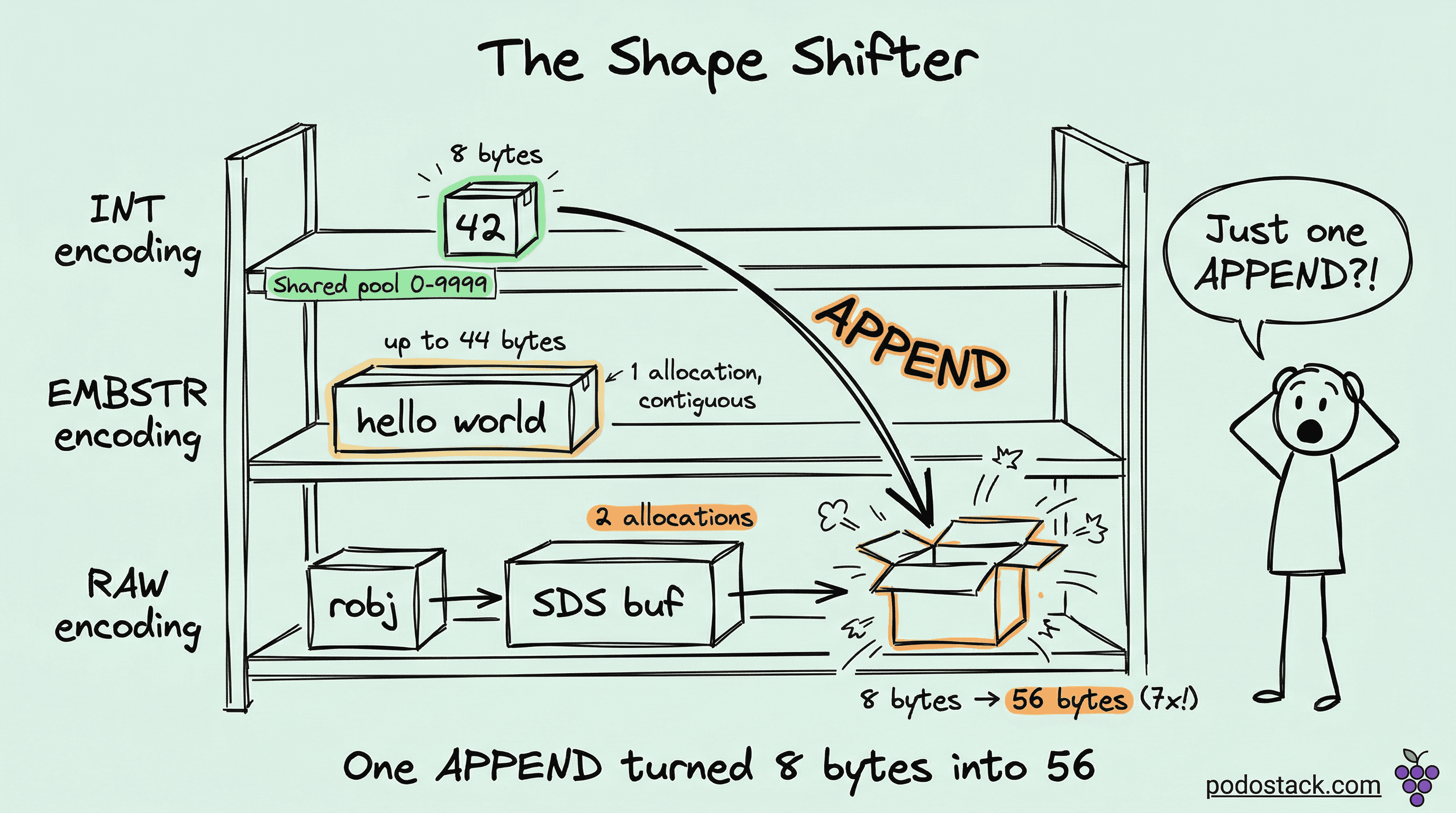
The three encodings
Every Redis string value uses one of three internal encodings:
INT - for values that fit in a 64-bit signed integer (-9223372036854775808 to 9223372036854775807). Redis doesn’t store the string “42” - it stores the actual number 42 as an 8-byte integer. No string overhead, no length tracking, no null terminator. Just the number.
EMBSTR - for strings up to 44 bytes. Redis allocates a single contiguous memory block for both the object header and the string data. One malloc() call, one cache line. Fast to allocate, fast to access.
RAW - for strings longer than 44 bytes. Redis uses SDS (Simple Dynamic String) - a custom string implementation that tracks length, capacity, and supports binary data. The object and SDS buffer are allocated separately - two malloc() calls, two memory regions.
Why 44 bytes?
That’s not arbitrary. A Redis object header takes 16 bytes. An SDS header for small strings takes 3 bytes. A null terminator takes 1 byte. A jemalloc allocation bucket is 64 bytes. So: 64 - 16 - 3 - 1 = 44. That’s the maximum string length that fits in a single 64-byte allocation alongside the object metadata.
At 45 bytes, Redis needs a second allocation. Two allocations mean more memory overhead, more fragmentation, and an extra pointer dereference on every access.
The shared integer pool
Here’s where it gets interesting. For integers from 0 to 9999, Redis doesn’t even allocate new objects. It maintains a pre-allocated pool of 10,000 integer objects at startup. Every key that stores the value 42 points to the same object in memory.
SET user:1:login_count 42
SET user:2:login_count 42
SET metrics:errors 42
All three keys reference the exact same Redis object. Zero additional memory per key (beyond the key entry itself). This is why counters and small numeric IDs are absurdly cheap in Redis.
You can verify this with DEBUG OBJECT:
DEBUG OBJECT user:1:login_countLook for refcount in the output. If it’s greater than 1, you’re sharing an object from the pool. For integers 0-9999, the refcount will typically be very high because Redis itself uses these objects internally too.
The encoding switch trap
This is the part that bites people. Redis automatically converts between encodings - and it’s a one-way street for certain operations.
SET counter 100
OBJECT ENCODING counter     -- "int"

APPEND counter " requests"
OBJECT ENCODING counter     -- "raw"

-- counter is now "100 requests" and there's no going back
Once Redis converts from INT to RAW, it stays RAW even if you later set it back to a pure number. Well, actually - a fresh SET will re-evaluate and pick INT again. But APPEND, SETRANGE, and other mutation operations force a permanent encoding change.
The same thing happens with EMBSTR. Any write operation on an EMBSTR string promotes it to RAW, because EMBSTR is immutable by design - Redis can’t resize a single-allocation block without potentially moving it.
SET name "alice"
OBJECT ENCODING name        -- "embstr"

APPEND name " smith"
OBJECT ENCODING name        -- "raw"
The value is only 11 bytes, well under the 44-byte limit. But APPEND forced the conversion. If you’d done SET name "alice smith" instead, it would’ve been EMBSTR.
Practical memory optimization
Use INCR/DECR for counters, not SET. INCR mykey initializes to 0 and increments atomically. The value stays INT-encoded. Don’t do SET mykey "1" followed by string manipulation - let Redis treat it as a number.
Keep numeric IDs as numbers. SET session:abc user_id 12345 keeps INT encoding. SET session:abc user_id "user_12345" forces RAW. Over millions of keys, that adds up fast.
Avoid mutating short strings. If you’re building a string incrementally with APPEND, consider building it in your application and doing a single SET. That way Redis picks the optimal encoding based on the final value, instead of promoting through encodings as you append.
Audit your encodings. Run OBJECT ENCODING on a sample of your keys. If counters show up as RAW instead of INT, something in your code is contaminating them with string operations.
How much does it actually save?
Ballpark for 1 million keys:
INT (0-9999, shared pool): practically zero extra memory beyond key entries
INT (outside pool): ~16 bytes/value = ~16 MB
EMBSTR (20-byte strings): ~64 bytes/value = ~64 MB
RAW (100-byte strings): ~160+ bytes/value = ~160 MB
The jump from INT to RAW for a simple counter is roughly 10x. Across millions of keys, that’s gigabytes of waste.
The rule of thumb
If it’s a number, keep it a number. If it’s a short string, write it once (don’t append). If it’s a long string, there’s nothing to optimize - RAW is the only option, and that’s fine. The wins come from not accidentally promoting cheap encodings into expensive ones.
Found this useful? Subscribe to Podo Stack for weekly database internals, Kubernetes patterns, and Cloud Native tools ripe for production.
Curious what encoding your Redis keys are actually using? Run OBJECT ENCODING on a few of your busiest keys - you might be surprised.