

Your users table has 45 columns. Your queries touch 5. Every time the database reads a row, it loads all 45 columns from disk into memory - the user’s login, email, and last_seen that you actually need, plus the 2KB biography, the profile picture URL, notification preferences, OAuth tokens, and 37 other columns you didn’t ask for. All of it pulled into the buffer pool, competing for cache space, slowing everything down.
I hit this wall on a SaaS product with 2 million users. The user profile page loaded in 200ms. The login check - which only needed email, password_hash, and is_active - took 45ms. For a login flow that runs thousands of times per minute, 45ms felt wrong. The table had grown to 38 columns over three years of feature additions. Someone had added a bio TEXT column, a settings JSONB column, and an avatar_blob for users who uploaded directly instead of using URLs.
I split the table in two. Login dropped to 8ms. The profile page didn’t change - it was already doing a full load. But the hot path got 5x faster because the database was reading 200-byte rows instead of 2KB rows.
That’s vertical partitioning.
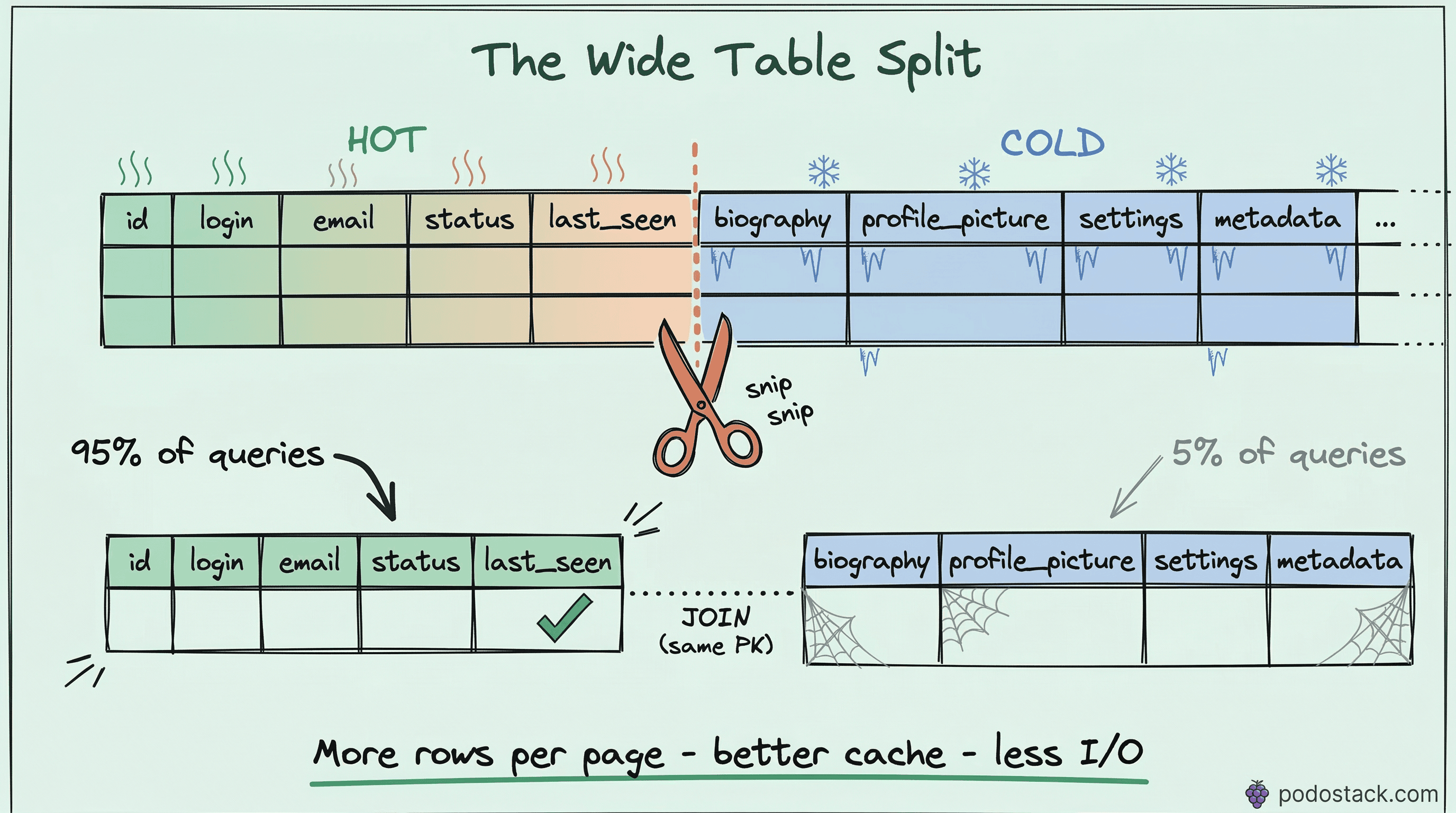
What vertical partitioning actually does
Horizontal partitioning splits a table into chunks by rows - users 1 through 1 million in one partition, 1 million to 2 million in another. Same columns, different rows.
Vertical partitioning splits a table by columns. Hot columns that you query constantly go into one table. Cold columns that you rarely need go into another. Same rows (same primary key), different columns.
BEFORE: one wide table
┌─────────────────────────────────────────────────────────┐
│ users (45 columns, ~2KB per row)                        │
│ id | email | password_hash | last_seen | bio | avatar | │
│    | settings | oauth_tokens | preferences | ...        │
└─────────────────────────────────────────────────────────┘

AFTER: two narrow tables
┌──────────────────────────────────┐  ┌─────────────────────────────┐
│ users (6 columns, ~200B per row) │  │ user_profiles (12 columns)  │
│ id | email | password_hash       │  │ user_id (FK) | bio          │
│    | is_active | last_seen       │  │ avatar | settings           │
│    | created_at                  │  │ oauth_tokens | preferences  │
└──────────────────────────────────┘  └─────────────────────────────┘
Why narrower rows are faster
Databases read data in pages - typically 8KB in PostgreSQL, 16KB in MySQL InnoDB. When you execute a query, the database doesn’t read individual rows. It reads entire pages into memory.
A wide row (2KB) fits about 4 rows per 8KB page. A narrow row (200 bytes) fits about 40 rows per page. That’s 10x more rows per I/O operation.
This has cascading effects:
Buffer pool efficiency. Your database caches pages in memory. If each page holds 40 rows instead of 4, the same amount of RAM caches 10x more rows. Cache hit rates go up. Disk reads go down.Sequential scan speed. When PostgreSQL does a sequential scan on a narrow table, it reads fewer pages to cover the same number of rows. A full scan of 2 million narrow rows might read 50K pages. The same scan on the wide table reads 500K pages.
Index performance. In PostgreSQL, the heap (table data) is separate from indexes. An index lookup finds the row location, then fetches the row from the heap. With narrower rows, the heap is smaller, so even random heap fetches are more likely to hit cached pages.
Implementation: step by step
Let’s walk through splitting a real users table.
1. Identify hot and cold columns
Look at your actual queries. Not what you think runs, but what really runs.
-- PostgreSQL: find which columns are actually used
-- Check pg_stat_statements or your query logs
-- Look for patterns like:
SELECT email, password_hash, is_active FROM users WHERE email = $1;  -- login: HOT
SELECT last_seen FROM users WHERE id = $1;                           -- presence: HOT
SELECT bio, avatar, settings FROM users WHERE id = $1;               -- profile page: COLD
Hot columns are touched by high-frequency queries - authentication, authorization, listings, search results. Cold columns are touched by low-frequency queries - profile detail pages, settings screens, admin views.
2. Create the cold table
-- Create the details table with the same primary key
CREATE TABLE user_profiles (
    user_id     BIGINT PRIMARY KEY REFERENCES users(id),
    bio         TEXT,
    avatar      BYTEA,
    settings    JSONB DEFAULT '{}',
    oauth_tokens JSONB,
    preferences JSONB DEFAULT '{}',
    company     VARCHAR(200),
    location    VARCHAR(200),
    website     VARCHAR(500),
    twitter     VARCHAR(100),
    github      VARCHAR(100),
    linkedin    VARCHAR(100)
);
3. Migrate the data
-- Copy cold columns to the new table
INSERT INTO user_profiles (user_id, bio, avatar, settings, oauth_tokens,
    preferences, company, location, website, twitter, github, linkedin)
SELECT id, bio, avatar, settings, oauth_tokens,
    preferences, company, location, website, twitter, github, linkedin
FROM users;

-- Verify row counts match
SELECT COUNT(*) FROM users;          -- 2,000,000
SELECT COUNT(*) FROM user_profiles;  -- 2,000,000
4. Drop cold columns from the main table
-- Remove cold columns from the hot table
ALTER TABLE users
    DROP COLUMN bio,
    DROP COLUMN avatar,
    DROP COLUMN settings,
    DROP COLUMN oauth_tokens,
    DROP COLUMN preferences,
    DROP COLUMN company,
    DROP COLUMN location,
    DROP COLUMN website,
    DROP COLUMN twitter,
    DROP COLUMN github,
    DROP COLUMN linkedin;
In PostgreSQL, DROP COLUMN doesn’t physically remove the data immediately - it marks the column as dropped. Run VACUUM FULL users to reclaim the space (this locks the table, so schedule it during maintenance).5. Create a view for backward compatibility
-- Applications that SELECT * still work
CREATE VIEW users_full AS
SELECT u.*, p.bio, p.avatar, p.settings, p.oauth_tokens,
    p.preferences, p.company, p.location, p.website,
    p.twitter, p.github, p.linkedin
FROM users u
LEFT JOIN user_profiles p ON u.id = p.user_id;
The LEFT JOIN ensures users without a profile row still appear. Existing queries that reference the old wide table can switch to the view without code changes - at least as a migration bridge.
Handling writes
This is where vertical partitioning gets tricky. Before the split, inserting a new user was one statement. Now it’s two, and they need to be atomic.
-- Must be in a single transaction
BEGIN;

INSERT INTO users (email, password_hash, is_active, created_at)
VALUES ('new@example.com', '$2b$12$...', true, NOW())
RETURNING id;

-- Use the returned id
INSERT INTO user_profiles (user_id, bio, settings)
VALUES (currval('users_id_seq'), '', '{}');

COMMIT;
If your application uses an ORM, you’ll need to update the model layer. In most ORMs, this means creating a separate UserProfile model with a one-to-one relationship. It’s more code, but it’s straightforward.
For updates, the same rule applies - if you’re updating columns in both tables, wrap it in a transaction:
BEGIN;
UPDATE users SET last_seen = NOW() WHERE id = 42;
UPDATE user_profiles SET bio = 'Updated bio' WHERE user_id = 42;
COMMIT;
In practice, most updates only touch one table. The login flow updates last_seen in users. The profile edit updates bio in user_profiles. Cross-table updates are the exception, not the rule.
Common use cases
User profiles. The example above. Authentication data (hot) vs display data (cold). Almost every application with user accounts benefits from this.
Product catalogs. Core product data - id, name, price, category, is_available - queried on every search result and listing page. Extended data - full_description TEXT, specifications JSONB, manufacturer_details - only loaded on the product detail page.
Sensitive data isolation. PII columns (SSN, date of birth, bank account) in a separate table with stricter access controls, encryption at rest, and audit logging. The main table doesn’t even contain the sensitive data, so a breach of the main table leaks less.
Audit columns. created_by, updated_by, approved_by, audit_notes - columns that exist for compliance but aren’t used in normal application queries. Moving them out keeps the hot table lean.
When NOT to do this
Small tables. If your table has 10,000 rows and fits entirely in memory regardless of width, vertical partitioning adds complexity for zero performance gain. Don’t optimize what isn’t slow.
All columns are hot. If your queries genuinely use most columns most of the time, splitting the table just adds JOINs. Vertical partitioning only helps when there’s a clear hot/cold divide.
Write-heavy workloads with cross-column updates. If every write touches columns in both tables, you’re doubling your write I/O and adding transaction coordination overhead. The read savings might not offset the write cost.
Measuring the impact
Before and after, check these:
-- PostgreSQL: table size before and after
SELECT pg_size_pretty(pg_total_relation_size('users'));

-- Average row width
SELECT avg(pg_column_size(t.*)) FROM users t LIMIT 10000;

-- Buffer cache hit ratio
SELECT
    sum(heap_blks_hit) AS cache_hits,
    sum(heap_blks_read) AS disk_reads,
    round(sum(heap_blks_hit)::numeric /
        (sum(heap_blks_hit) + sum(heap_blks_read)), 4) AS hit_ratio
FROM pg_statio_user_tables
WHERE relname = 'users';
If your cache hit ratio goes from 85% to 98% after the split, you’ve freed up buffer pool space that every query on the system benefits from. The impact often extends beyond the table you partitioned.
Found this useful? Subscribe to Podo Stack for weekly database patterns and Cloud Native tools ripe for production.
Have you split a wide table in production? What was the before/after difference? I’d love to hear your numbers - reply to this email or leave a comment.