

Last year I was debugging a slow endpoint - an order history page that took 1.2 seconds to load. The table had 50 million rows. There was an index on user_id. EXPLAIN showed an index scan. Everything looked correct. But the query was still slow, because after finding the right rows in the index, the database went back to the main table to fetch amount and created_at. Fifty million rows of random I/O to the heap, just to grab two extra columns.
I added those two columns to the index. Response time dropped to 40ms. Same query, same data, same hardware. The only difference: the database stopped reading the table entirely.
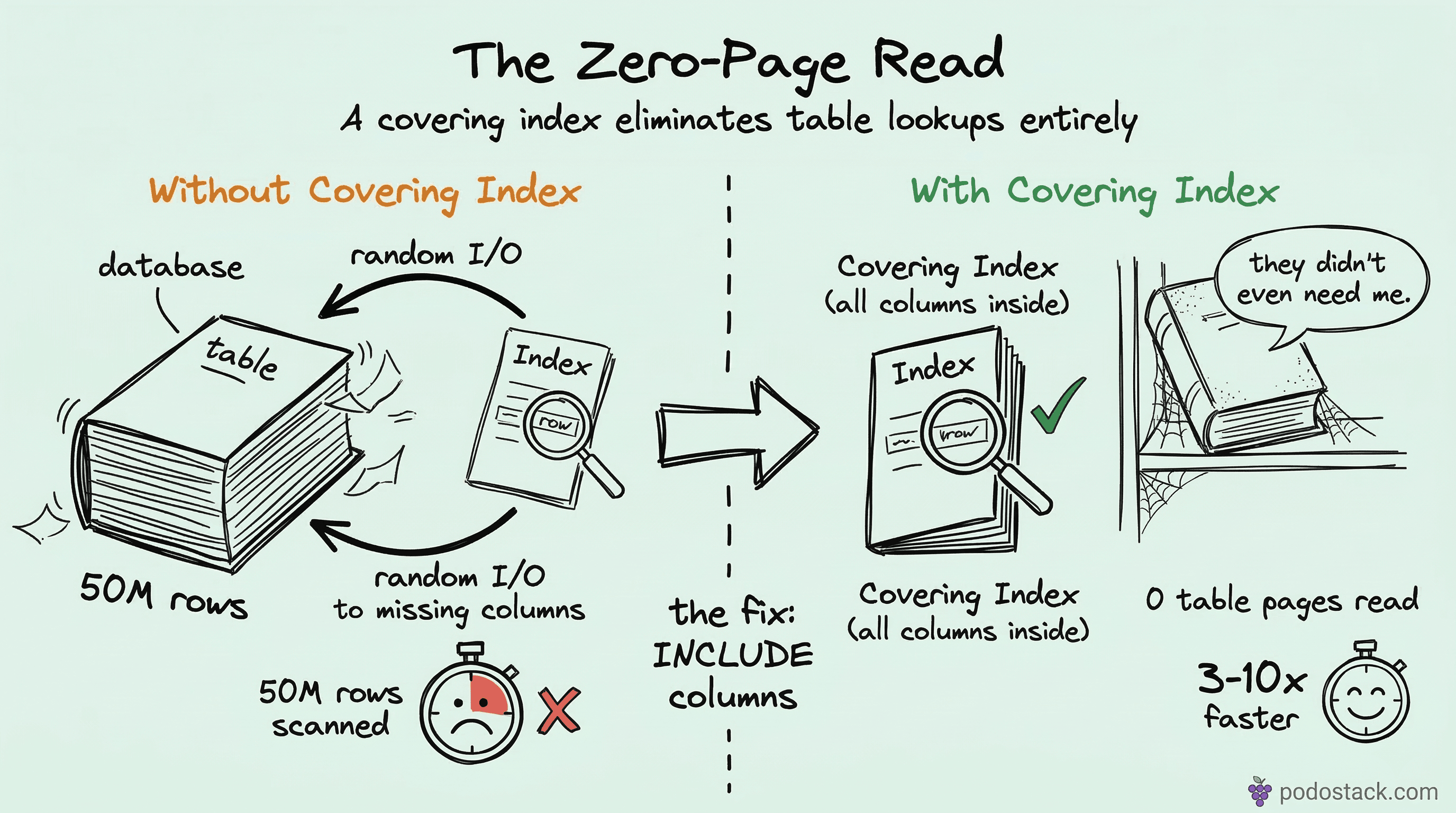
That’s a covering index.
What “covering” actually means
A regular index helps the database find rows. It says “the rows you want are at positions 47, 812, and 3901 in the table.” Then the database goes to those positions and reads the full rows. That second step - going from the index back to the table - is called a “table lookup” or “heap fetch.”
A covering index eliminates that second step. It contains all the columns the query needs, right there in the B-tree leaf pages. The database reads the index, gets everything it needs, and never touches the table.
Think of it like a book index that doesn’t just list page numbers, but also prints the relevant paragraph right next to each entry. You’d never need to flip to the actual page.
MySQL: add columns to the key
In MySQL (InnoDB), there’s no special syntax. You just add every column the query references - in SELECT, WHERE, ORDER BY, GROUP BY - to the index definition.
Say you have this query:
SELECT amount, created_at
FROM orders
WHERE user_id = 123
  AND status = 'paid';
A regular index on (user_id, status) finds the rows quickly, but MySQL still fetches amount and created_at from the clustered index (the actual table). To make it covering:
CREATE INDEX ix_orders_covering
ON orders (user_id, status, amount, created_at);
Run EXPLAIN and look for “Using index” in the Extra column. That’s MySQL telling you it didn’t touch the table at all. Not “Using index condition” - that’s something else (index pushdown). You want plain “Using index.”
Column order matters. Put the equality filters first (user_id, status), then the columns you’re just carrying along (amount, created_at). The first columns define the lookup path in the B-tree; the trailing columns are passengers.
PostgreSQL: INCLUDE clause
PostgreSQL 11 introduced a cleaner approach. Instead of stuffing everything into the key, you separate the search columns from the payload columns:
CREATE INDEX ix_orders_covering
ON orders (user_id, status) INCLUDE (amount, created_at);
The INCLUDE columns are stored in the leaf pages but aren’t part of the B-tree structure. This matters because:
They don’t affect sort order or uniqueness constraints
The B-tree’s internal pages stay smaller (faster traversal)
You can include data types that aren’t orderable
Run EXPLAIN ANALYZE and look for “Index Only Scan” in the output. That’s PostgreSQL’s equivalent of MySQL’s “Using index.”
One catch: PostgreSQL needs the visibility map to be reasonably up to date. If your table has a lot of recently-modified rows that haven’t been vacuumed yet, PostgreSQL might still need to check the heap. Keep autovacuum healthy.
The speedup is real - here’s why
A regular indexed query does two types of I/O:
Sequential reads through the B-tree (fast, predictable)
Random reads jumping to table pages (slow, unpredictable)
The random I/O is the killer. On spinning disks, each random read is ~10ms. Even on SSDs, it’s 50-100 microseconds per read, and those add up. If your index finds 500 matching rows spread across 400 different table pages, that’s 400 random reads you don’t need.
A covering index turns everything into sequential B-tree reads. The data sits together in the leaf pages, sorted by the index key. That’s where the 3-10x comes from - you’re replacing hundreds of random hops with a single range scan through contiguous index pages.
The trade-offs
Wider indexes aren’t free. Every INSERT, UPDATE, and DELETE now has to maintain a larger index structure. If your table is write-heavy - hundreds of inserts per second - measure the DML impact before deploying.
Some practical guidelines:
Don’t include large columns. Adding a
TEXTorBLOBto an index bloats the B-tree and defeats the purpose. If you need a 4KB description column, it shouldn’t be in the index.Don’t cover every query. Pick your top 3-5 slow queries and cover those. An index that covers one query might hurt another by making the write path slower.
Watch the total index size. If your table has 10 indexes and you’re adding columns to all of them, you might end up with indexes larger than the table itself. Check
pg_total_relation_size()orSHOW TABLE STATUS.
When covering indexes help most
They shine in three scenarios:
OLTP endpoints with tail latency SLAs. If your p99 has to stay under 10ms, eliminating table lookups removes the main source of variance. The B-tree scan is predictable; heap fetches are not.
Reporting queries with JOINs. A dashboard that joins orders to customers to products - if the orders side is covered, you cut the I/O in half. This compounds across multiple joins.
Microservices with high concurrency. When 200 requests per second hit the same query, each one doing heap fetches, you’re competing for buffer pool space. Covering indexes mean each request touches fewer pages, so the buffer pool stays effective for longer.
If you’re working with star schema designs, covering indexes on fact tables are especially powerful - fact tables are wide, and your queries usually only need a few measure columns.
Quick checklist
Before adding a covering index, ask yourself:
Does
EXPLAINshow a table lookup after the index scan?Is the query in a hot path (high frequency or strict latency requirement)?
Are the extra columns small (integers, dates, short strings)?
Is the table more read-heavy than write-heavy?
If all four are yes, a covering index is probably worth it. Add it, run EXPLAIN again, confirm you see “Using index” or “Index Only Scan,” and measure the actual latency change.
Found this useful? Subscribe to Podo Stack for weekly database patterns, Kubernetes internals, and Cloud Native tools ripe for production.
If you haven’t read it yet, check out Star Schema Basics - covering indexes on fact tables are one of the biggest wins in analytical workloads.