

Every database course teaches normalization first. Third normal form. No redundancy. Single source of truth. And it’s the right starting point - until your dashboards take 12 seconds to load because the query joins seven tables to show a username next to an order.
Normalization optimizes for writes. Denormalization optimizes for reads. Most production systems are 90%+ reads. You do the math.
I’m not saying throw away your foreign keys. I’m saying there are specific, measurable situations where copying a column into another table saves you seconds of query time and megabytes of memory. And that trade-off is worth making consciously.
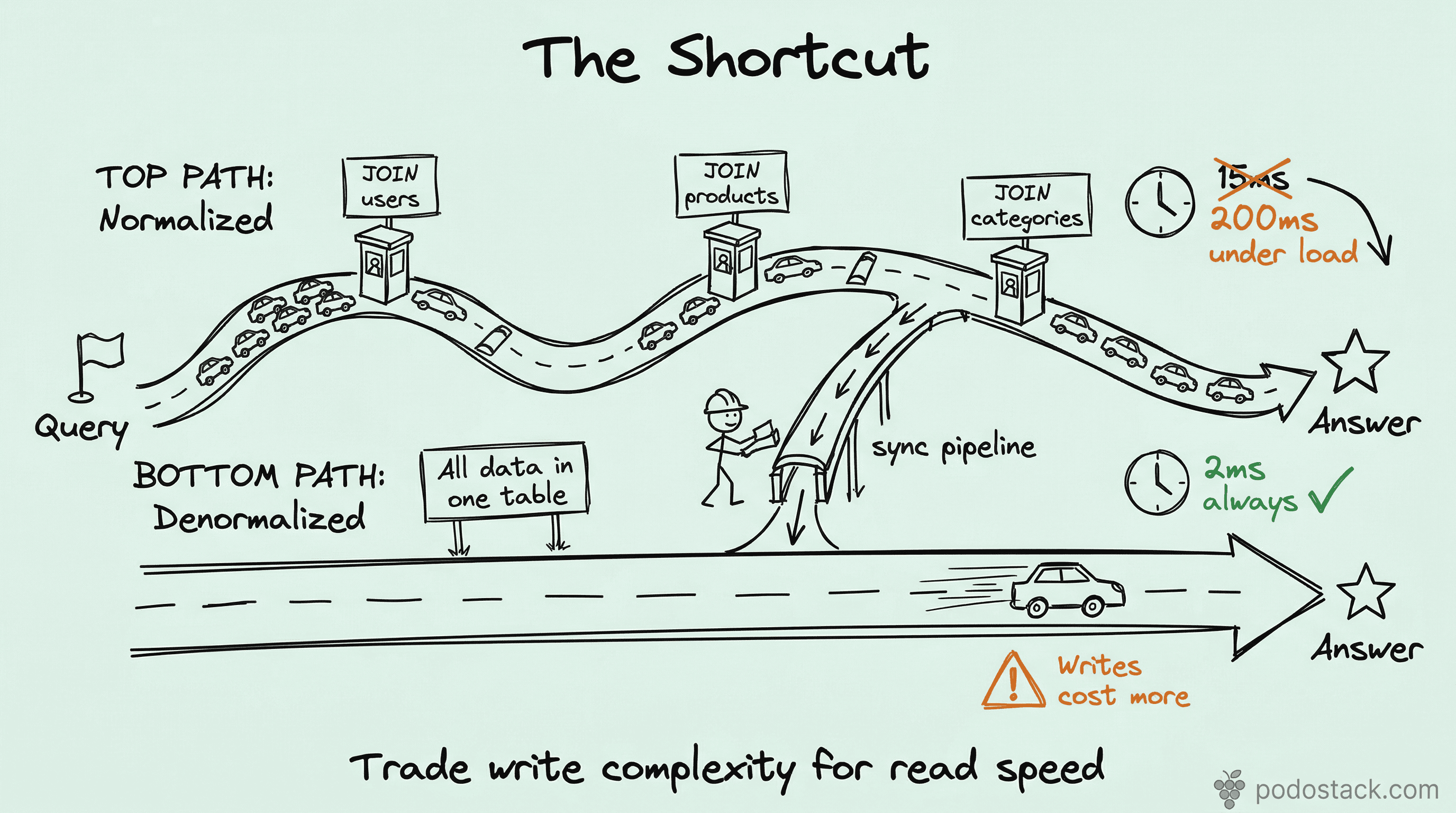
The actual cost of JOINs at scale
A single JOIN between two indexed tables is fast. Two JOINs - still fine. But production queries rarely stop there.
Consider an order details page: orders JOIN users JOIN products JOIN shipping_addresses JOIN payment_methods JOIN order_items. Six tables. Each JOIN multiplies the work - fetching pages from different parts of disk, building hash tables in memory, matching keys across indexes.
At 1,000 requests per second, those JOINs don’t just cost time. They cost buffer pool pages, CPU cycles, and connection slots. The query that takes 15ms at low traffic takes 200ms under load because every JOIN competes for the same memory.
The pattern: embed what you read together
The core idea is simple. If you always read user_name when you read orders - put user_name in the orders table.
ALTER TABLE orders
  ADD COLUMN customer_name VARCHAR(100),
  ADD COLUMN customer_country CHAR(2);
Now your order list query goes from:
SELECT o.id, o.total, u.name, u.country
FROM orders o
JOIN users u ON o.user_id = u.id
WHERE o.created_at > '2026-01-01';
To:
SELECT id, total, customer_name, customer_country
FROM orders
WHERE created_at > '2026-01-01';
One table. One index scan. No JOIN. The query that used to touch two B-trees now touches one.
When denormalization makes sense
Not every JOIN deserves elimination. Denormalize when all three conditions are true:
Read-heavy ratio. The table is read 10-100x more than it’s written. E-commerce order history, analytics dashboards, reporting tables, user activity feeds. If writes are frequent, the sync cost eats your read gains.
The JOIN is in the hot path. Not every slow query matters. Denormalize the queries that users wait on - page loads, API responses, search results. If it’s a nightly batch job, the JOIN is fine.
The source data changes rarely. Customer names change infrequently. Countries almost never change. Product titles change sometimes. Prices change often. Denormalize the stable columns. Leave the volatile ones normalized.
Keeping the data in sync
This is where denormalization gets its bad reputation. You’ve duplicated data. Now you have two sources of truth. If the user changes their name, the users table updates but orders.customer_name doesn’t - unless you handle it.
Three patterns, from simplest to most reliable:
Triggers. The database itself keeps the copy in sync. Fast, automatic, invisible to your application:
CREATE TRIGGER sync_customer_name
AFTER UPDATE ON users
FOR EACH ROW
  UPDATE orders
  SET customer_name = NEW.name
  WHERE user_id = NEW.id;
The downside: triggers are hard to debug and easy to forget about. They don’t show up in your application code.
Application-level sync. Your service updates both tables in the same transaction. Explicit, visible in code, reviewable in PRs. But you have to remember to do it everywhere.
Background reconciliation. A scheduled job compares the denormalized columns with their source tables and fixes drift. This is your safety net, not your primary sync:
UPDATE orders o
JOIN users u ON o.user_id = u.id
SET o.customer_name = u.name
WHERE o.customer_name != u.name;
Run it hourly or nightly. It catches whatever the triggers or application code missed.
In practice, most teams use triggers for the primary sync and a background job as a safety net. It’s belt and suspenders, but stale data in production is worse than a few extra writes.
Measuring the impact
Don’t denormalize on gut feeling. Measure before and after:
-- Before: JOIN query
EXPLAIN ANALYZE
SELECT o.id, o.total, u.name
FROM orders o JOIN users u ON o.user_id = u.id
WHERE o.created_at > '2026-01-01';

-- After: denormalized query
EXPLAIN ANALYZE
SELECT id, total, customer_name
FROM orders
WHERE created_at > '2026-01-01';
You should see the number of rows examined drop, the execution time shrink, and the query plan simplify from a nested loop or hash join to a simple range scan.
Also check buffer pool pressure - fewer pages loaded per query means more room for other indexes and queries.
When not to denormalize
Highly volatile source data. If the source column changes multiple times per hour per row, the sync cost dominates. You’re writing more to keep the copy current than you’re saving on reads.
Low traffic. If the query runs 50 times a day, the JOIN overhead is irrelevant. Don’t add complexity for a problem that doesn’t exist yet.
Analytics you can pre-compute. If you need total_orders per user, a materialized view or a summary table is cleaner than a counter column that you increment on every insert.
When vertical partitioning solves it. Sometimes the real problem isn’t JOINs - it’s that your table is too wide and queries load columns they don’t need. Split the table first, denormalize second.
The mindset shift
Normalization is a design principle. Denormalization is an engineering decision. You normalize when modeling the domain. You denormalize when serving the users.
The best schemas I’ve seen do both: normalized source tables that are the system of record, with denormalized read tables or columns that serve the hot path. The source stays clean. The reads stay fast.
It’s not about breaking the rules. It’s about knowing which rules exist for the textbook and which exist for production.
Found this useful? Subscribe to Podo Stack for weekly database patterns, Kubernetes internals, and Cloud Native tools ripe for production.
Running a dashboard that joins seven tables on every page load? Pick the one JOIN that hurts most, duplicate one column, and measure the difference. Start small.