

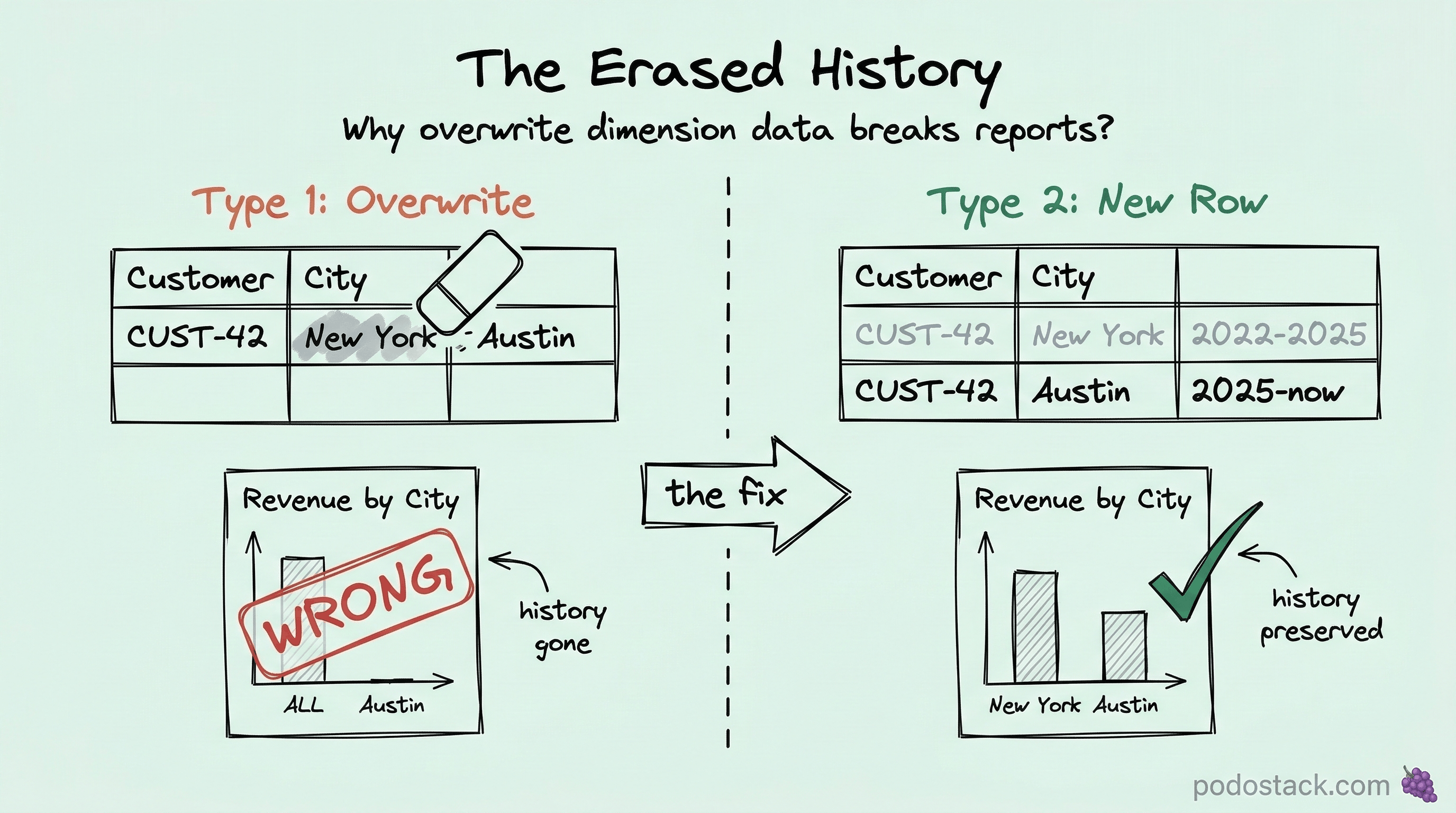
The dashboard showed $2M revenue from New York. The client had moved to Texas six months ago. The numbers were right - the money was real. But the attribution was wrong. Every sale after the move was still tagged “New York” because someone updated the customer’s address in place. The history was gone.
That's when I learned about Slowly Changing Dimensions. If you've read the star schema basics, you know that dimension tables hold the "who, what, where, when" of your data. But dimensions change. Customers move. Products get renamed. Departments reorganize. The question isn't whether dimensions change - it's how you handle it when they do.
The problem: dimensions aren’t static
In a transactional database, you just update the row. Customer moved? UPDATE customers SET city = 'Austin' WHERE id = 42. Done. Current state preserved. History erased.
In a data warehouse, erasing history breaks reports. That $2M attributed to New York? Half of it was earned while the customer was in Texas. Your geographic revenue report is now lying to everyone in the quarterly review.
Slowly Changing Dimensions (SCD) is the framework for handling this. It defines six types of strategies, each with different trade-offs between simplicity, storage, and historical accuracy.
Type 1: Overwrite
The simplest approach. When something changes, just overwrite the old value.
-- Customer moves from New York to Austin
UPDATE DimCustomer
SET city = 'Austin', state = 'Texas'
WHERE customer_id = 'CUST-42';
What happens: All historical facts now show Austin. It’s as if the customer was always in Texas.
When to use it: Corrections (fixing a typo in a product name), attributes nobody analyzes historically (internal codes, formatting changes), or when you genuinely don’t care about history.
The cost: You lose the ability to answer “what was true at the time?” If someone asks “where was this customer when they placed order #5847?” - you can’t answer that anymore.
Most teams start here because it’s easy. Many stay here longer than they should.
Type 2: Add a new row
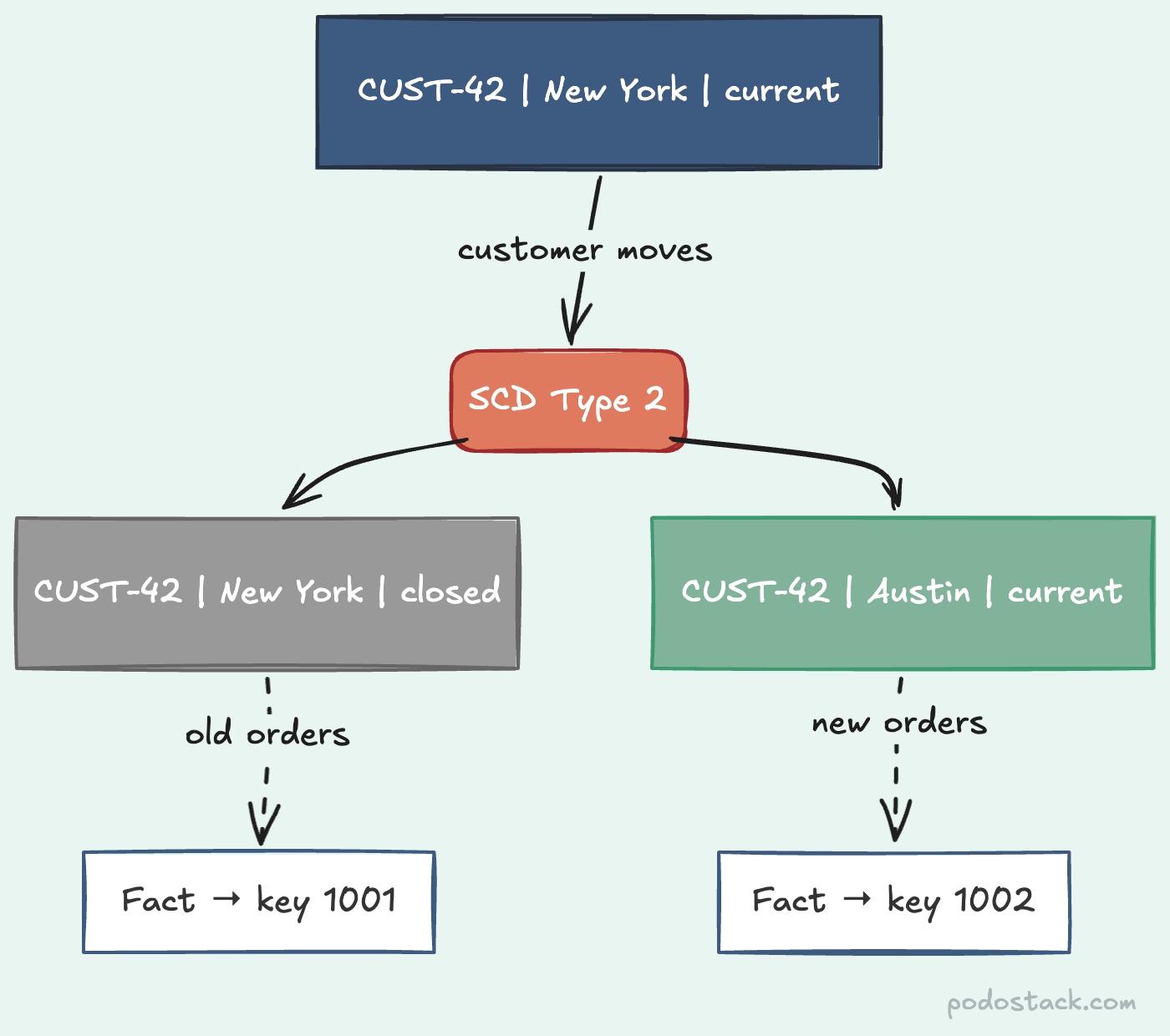
This is the workhorse of dimensional modeling. When an attribute changes, you don’t update - you insert a new row and mark the old one as expired.
-- Before: one row for CUST-42
-- customer_key | customer_id | city     | valid_from | valid_to   | is_current
-- 1001         | CUST-42     | New York | 2022-01-15 | 9999-12-31 | true

-- After the move: two rows for CUST-42
-- customer_key | customer_id | city     | valid_from | valid_to   | is_current
-- 1001         | CUST-42     | New York | 2022-01-15 | 2025-06-30 | false
-- 1002         | CUST-42     | Austin   | 2025-07-01 | 9999-12-31 | true
The surrogate key (customer_key) is different for each version. The natural key (customer_id) stays the same. Facts that happened while the customer was in New York point to key 1001. Facts after the move point to key 1002. History preserved.
Querying current state is easy:
-- Current customers
SELECT * FROM DimCustomer WHERE is_current = true;

-- Customer state at a specific point in time
SELECT * FROM DimCustomer
WHERE customer_id = 'CUST-42'
  AND '2025-03-15' BETWEEN valid_from AND valid_to;
When to use it: Any attribute you’d want to analyze historically. Customer geography, product category, employee department, account status. This is the default choice for most data warehouses.
The cost: The dimension table grows. One customer with 5 address changes becomes 5 rows. For most dimensions this is fine - you might have 100K customers with an average of 1.5 versions each. 150K rows is nothing. But if you have high-churn attributes on a large dimension, watch the table size.
Type 2 is why the star schema article emphasized surrogate keys. They’re what make this pattern possible.
Type 3: Add a column
Instead of adding rows, add columns for the previous value.
-- Type 3: current and previous in the same row
-- customer_key | customer_id | city     | previous_city | city_changed_on
-- 1001         | CUST-42     | Austin   | New York      | 2025-07-01
When to use it: Honestly? Almost never. You can only see one previous value. If the customer moved from Boston to New York to Austin, Boston is gone. It’s Type 1’s limitation but slightly less bad.
The one valid use case: "current vs previous" comparisons. "Compare this quarter's sales by the customer's current region vs their previous region." That's a narrow requirement, but some finance teams need exactly this.
Type 4: Separate history table
Current data stays in the main dimension table (fast lookups). History goes to a separate table (full audit trail).
-- Main table: always current
CREATE TABLE DimCustomer (
    customer_key INT PRIMARY KEY,
    customer_id  VARCHAR(20),
    city         VARCHAR(100),
    state        VARCHAR(50)
);

-- History table: every change
CREATE TABLE DimCustomerHistory (
    history_key  INT PRIMARY KEY,
    customer_key INT,
    city         VARCHAR(100),
    state        VARCHAR(50),
    valid_from   DATE,
    valid_to     DATE
);
When to use it: When the main dimension table is very large and you need fast current-state queries, but also need to access history occasionally. The history table can be partitioned or archived independently.
It’s more complex to maintain (two tables, two ETL pipelines), so use this only when Type 2’s table growth is actually causing performance problems. For most teams, it’s premature optimization.
Type 6: The hybrid (1 + 2 + 3)
Combines Types 1, 2, and 3. Yes, the number 6 = 1 + 2 + 3. That’s literally where the name comes from.
-- Type 6: new rows + current value column + overwrite
-- customer_key | customer_id | city     | current_city | valid_from | valid_to   | is_current
-- 1001         | CUST-42     | New York | Austin       | 2022-01-15 | 2025-06-30 | false
-- 1002         | CUST-42     | Austin   | Austin       | 2025-07-01 | 9999-12-31 | true
Notice current_city is “Austin” on both rows. When the customer moves again, you:
Add a new row (Type 2)
Update
current_cityon all rows for this customer (Type 1)The historical
citycolumn preserves what was true at the time (Type 3 flavor)
When to use it: When you need to group by current state AND filter by historical state in the same query. “Show all revenue for customer CUST-42 grouped by their current city, but only include transactions from when they were in New York.”
It’s the most flexible but also the most complex to maintain. Your ETL has to update current_city across all historical rows on every change. In practice, I’ve seen this used mostly in financial reporting where auditors need both views simultaneously.
Which type should you use?
For 80% of cases:
Type 1 for attributes nobody analyzes historically (internal codes, display formatting)
Type 2 for everything else (geography, category, status, department)
For the remaining 20%:
Type 6 when compliance or finance requires both current and historical views in the same query
Type 4 when your dimension table has millions of rows with frequent changes and Type 2 is causing performance issues
Type 3 when you specifically need “current vs previous” comparisons and nothing else
Don’t mix types randomly within the same dimension. Pick one strategy per attribute. A customer dimension might use Type 1 for display_name and Type 2 for city and segment. Document which attributes use which type - your future self will thank you.
Common mistakes
Not setting valid_to on the old row. If you insert a new Type 2 row but forget to close the previous row’s valid_to, you’ll have overlapping validity periods. Point-in-time queries break silently.
Using natural keys in fact tables. If your fact table references customer_id instead of customer_key, you can’t distinguish between the New York version and the Austin version. The whole point of Type 2 is the surrogate key.
Treating Type 2 as an audit log. SCD Type 2 tracks business-meaningful changes - the customer moved, the product changed category. It’s not for “someone edited a comment at 3 AM.” Use event sourcing or an audit table for operational changes.
Running Type 2 on high-frequency attributes. If a sensor reading changes every second and you're doing Type 2 on it, your dimension table will explode. High-frequency changes belong in fact tables as measures, not in dimensions.
Found this useful? Subscribe to Podo Stack for weekly data engineering patterns and Cloud Native tools ripe for production.
If you haven’t read it yet, start with Star Schema Basics - it explains the foundation that SCD builds on.