


The on-call engineer stares at a graph. The host has 40 GB of free disk. The application logs say write error: no space left on device. Every attempt to create a new file fails. Restarting the service doesn't help. Rebooting doesn't help. This makes no sense because the space is right there, unused.
The answer is the filesystem ran out of inodes, and df -h (which shows space) doesn't tell you that. df -i (which shows inodes) does, but most monitoring dashboards only track the first one. This post is about why inode exhaustion is its own failure class, why small-file workloads hit it first, and how to avoid getting paged at 3 AM for a disk that has plenty of disk.
What an inode actually is
On Unix-style filesystems, every file and directory has two parts:
The inode, which holds all metadata about the file: permissions, owner, size, timestamps, and pointers to the data blocks where the contents live.
The data blocks, the actual bytes of the file's contents.
A file's name is not in the inode. Names live in directory entries (dentries), which are just tables that map names to inode numbers. When you run ls, you're reading a directory's dentries. When you actually open a file, you go through the dentry to get the inode, then through the inode to get the data blocks.
The number of files a filesystem can hold is limited by two things:
The data space available (how many bytes can you write).
The inode table size (how many distinct files can you have).
Most filesystems (ext4, for example) allocate the inode table at format time. Once the inode count is set, changing it requires reformatting the filesystem. XFS grows inodes dynamically and doesn't hit this limit in the same way, which is one reason big-file-count workloads on Linux tend toward XFS.
Links
Why small-file workloads are the ones that hit the wall
The default ext4 inode-to-data ratio is one inode per 16 KiB of storage. On a 100 GB partition, that's about 6.5 million inodes. Sounds like a lot, until you hit:
A Maildir-style mail server with 100 million small messages.
A caching proxy (Squid, Varnish on disk) with millions of tiny cached responses.
A build system that keeps per-version artifacts forever.
A Prometheus TSDB with aggressive retention on high-cardinality metrics, producing millions of tiny block files.
A Docker registry running a cleanup policy that hasn't kept up.
Each of these creates many small files. Inodes get consumed at a rate way faster than bytes do. The filesystem has plenty of space but runs out of inodes. no space left on device is the generic error Linux returns in both cases, so the error message lies to you.
The diagnosis command everyone should know
Two flags of df:
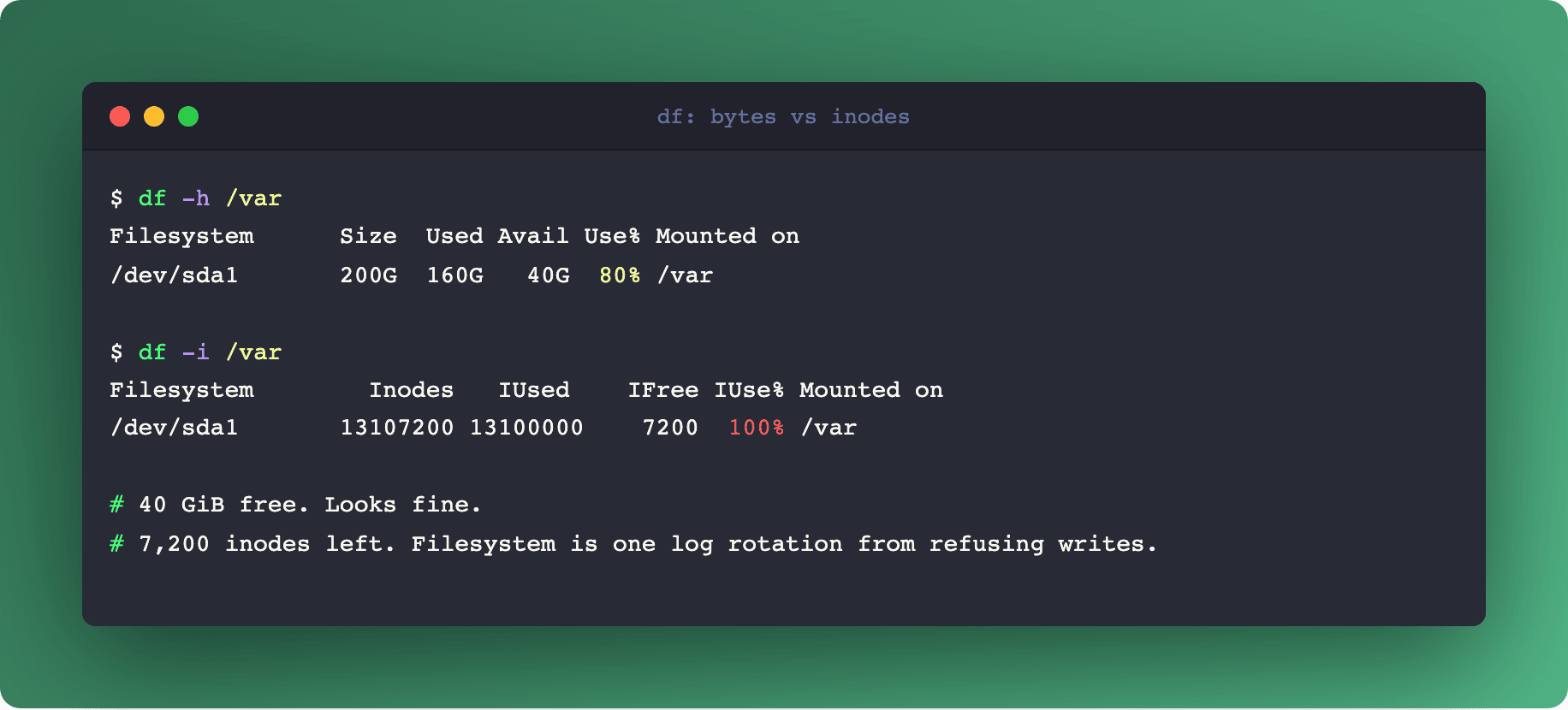
$ df -h /var
Filesystem      Size  Used Avail Use% Mounted on
/dev/sda1       200G  160G   40G  80% /var

$ df -i /var
Filesystem        Inodes   IUsed    IFree IUse% Mounted on
/dev/sda1       13107200 13100000    7200 100% /var
First output: 40 GB free. Everything looks fine. Second output: 100% of inodes used, seven thousand remaining. That's the real state.
Every monitoring system should track both. If your Prometheus or Datadog is only alerting on disk percentage used (node_filesystem_avail_bytes), you're blind to inode exhaustion. Add node_filesystem_files versus node_filesystem_files_free.
The Prometheus query for an alert:
(
  node_filesystem_files - node_filesystem_files_free
) / node_filesystem_files > 0.85
Page when inode usage crosses 85%. You'll have time to clean up before the filesystem refuses new writes.
Links
Finding the offender: where are all these files
When inode usage is high and you need to find the responsible directory, two commands help:
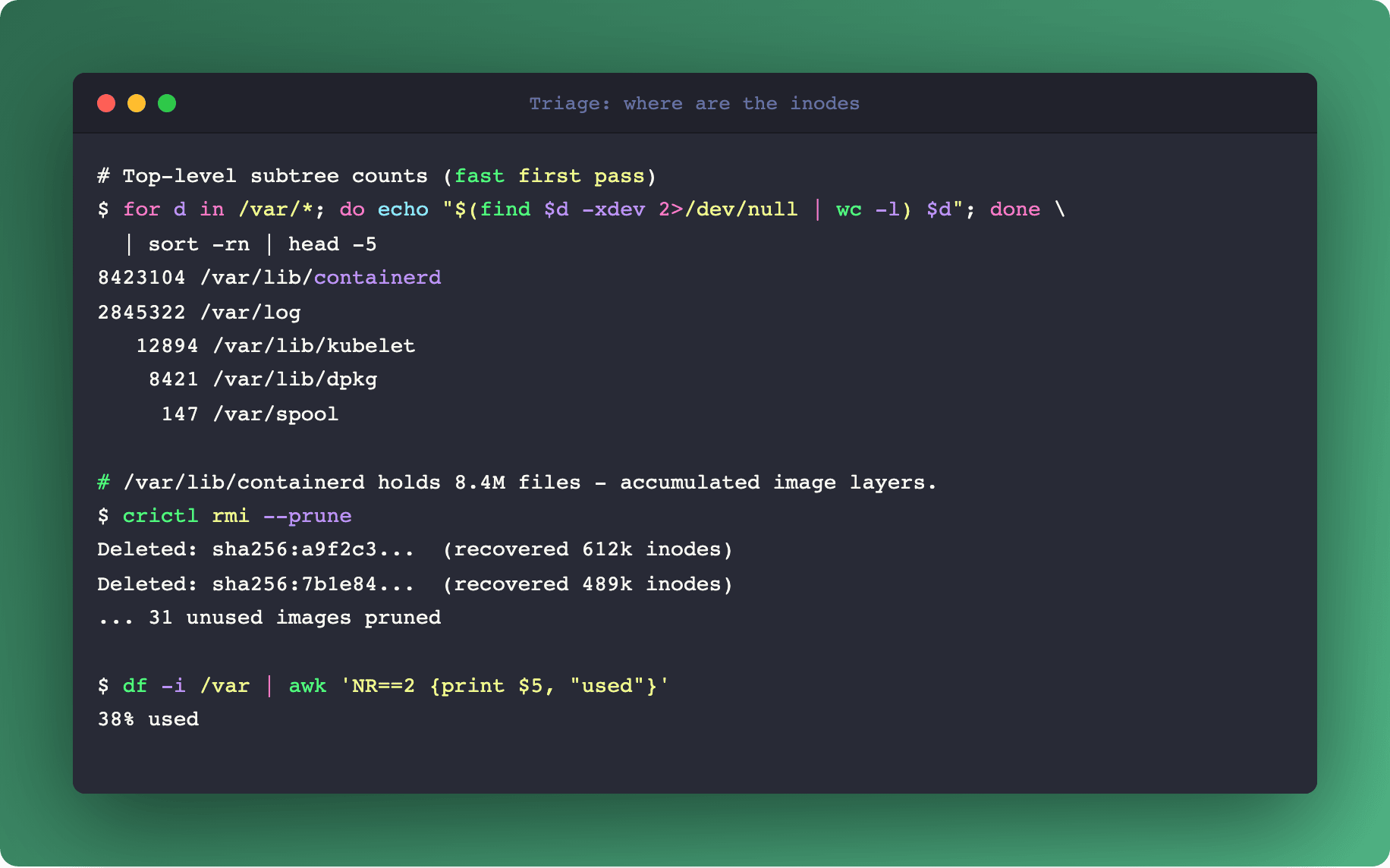
# Directories with the most files directly
$ find /var -xdev -type d -exec sh -c 'echo "$(ls -a "$0" | wc -l) $0"' {} \; | sort -rn | head -20

# Total file count per top-level directory (more useful for triage)
$ for dir in /var/*; do echo "$(find "$dir" -xdev 2>/dev/null | wc -l) $dir"; done | sort -rn | head
The second form is faster for a rough first pass. The first form shows which directories have thousands of entries directly (an indicator of a bad storage pattern that doesn't shard into subdirectories).
On Kubernetes nodes, common offenders:
/var/lib/containerd/*for accumulated image layers (runcrictl rmi --prune)./var/log/pods/*for orphaned pod logs when the kubelet log cleanup didn't run./var/lib/kubelet/pods/*/volumes/kubernetes.io~empty-dir/*for massive tmpfs-backed workloads that forgot to clean up./var/lib/docker/overlay2/*for older container runtimes.
Links
Hard links, soft links, and the inode counter
A detail that matters for cleanup: hard links and soft links count differently.
A hard link is another dentry pointing to the same inode. Two names, one inode, one set of data blocks. Hard links don't consume extra inodes because they reuse the existing one. Deleting a file with hard links only frees the inode when the link count reaches zero.
A symlink (soft link) is its own file. It has its own inode and contains a text path to the target. Symlinks do consume inodes. A directory full of symlinks hits inode exhaustion just like a directory full of real files.
Practical consequence: if you're trying to reduce inode usage and you have a directory with 10 million hard links, rm-ing them doesn't free inodes in proportion. If that same directory had symlinks, each rm frees an inode.
Filesystem choices that change the calculus
Three common filesystems, three different stories:
ext4. Fixed inode count at format time. Reformat to change it. Safe default for servers with predictable file counts.
XFS. Dynamic inode allocation. Grows as needed, bounded by available space. No pre-allocation. Preferred for workloads with unpredictable or very large file counts.
btrfs, ZFS. Different conceptual models. ZFS has effectively unlimited objects but has its own resource limits (ARC memory, metadata block groups). Btrfs similar. Both can hit different walls but not the classic inode-exhaustion wall.
If you're building a storage tier for a Maildir server, a caching proxy, or any workload with millions of small files, XFS is usually the less painful default.
If you're stuck on ext4 and inode exhaustion is chronic, two options:
Reformat with
mke2fs -N <inode-count>at creation time, setting a higher inode count (at the cost of disk space for metadata).Change the inode density with
-iflag:mke2fs -i 4096creates one inode per 4 KiB instead of 16 KiB, quadrupling the count.
Both require reformat. There's no online resize path for ext4 inode count.
Links
The production-grade checklist
For any Linux-based production infrastructure:
Monitor both disk space and inode usage. Same dashboard, same alerts.
Know which of your workloads produce small-file storms. Mail, caching, logs, container images. These are the inode-exhaustion candidates.
Prefer XFS for small-file-heavy workloads. Default ext4 everywhere else.
Alert at 85% inode usage. By 95% you're already in cleanup mode.
Keep a runbook for inode emergencies. The
findcommands above, the common K8s offenders, the escape hatch of reformatting the volume.
Summary
Inode exhaustion is one of those failure classes that only matters until it matters, and then it takes down your node at the worst time. It's not a bug, it's a filesystem choice that shows up in specific workload patterns. The fix is monitoring on the right metric and choosing the right filesystem for the workload profile.
When "no space left on device" doesn't match your free-space graph, check df -i first.
For the surface where this matters on Kubernetes specifically (image pull storms, log rotation, ephemeral volume cleanup), see Cold Start: A Pod's First 60 Seconds. For Prometheus-side small-file awareness, Prometheus WAL Internals covers the TSDB block structure.